Arabic on a thermal printer, and the five bytes that ate a roll
Why ESC/POS printers mangle Arabic, how to print it as a 1-bit image at the head's exact width, and the geometry bug that turned a 12 cm receipt into a roll on the floor.
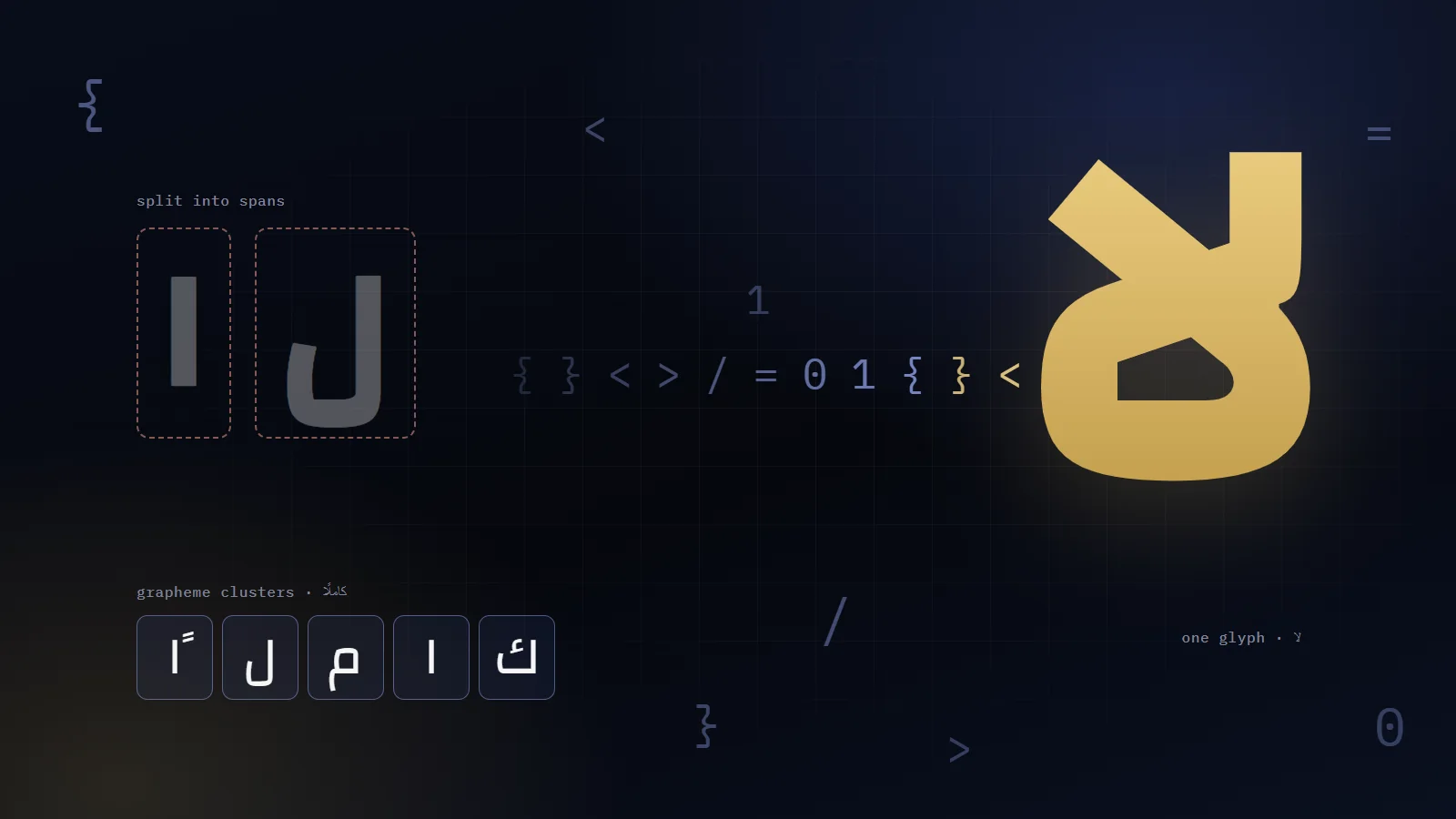
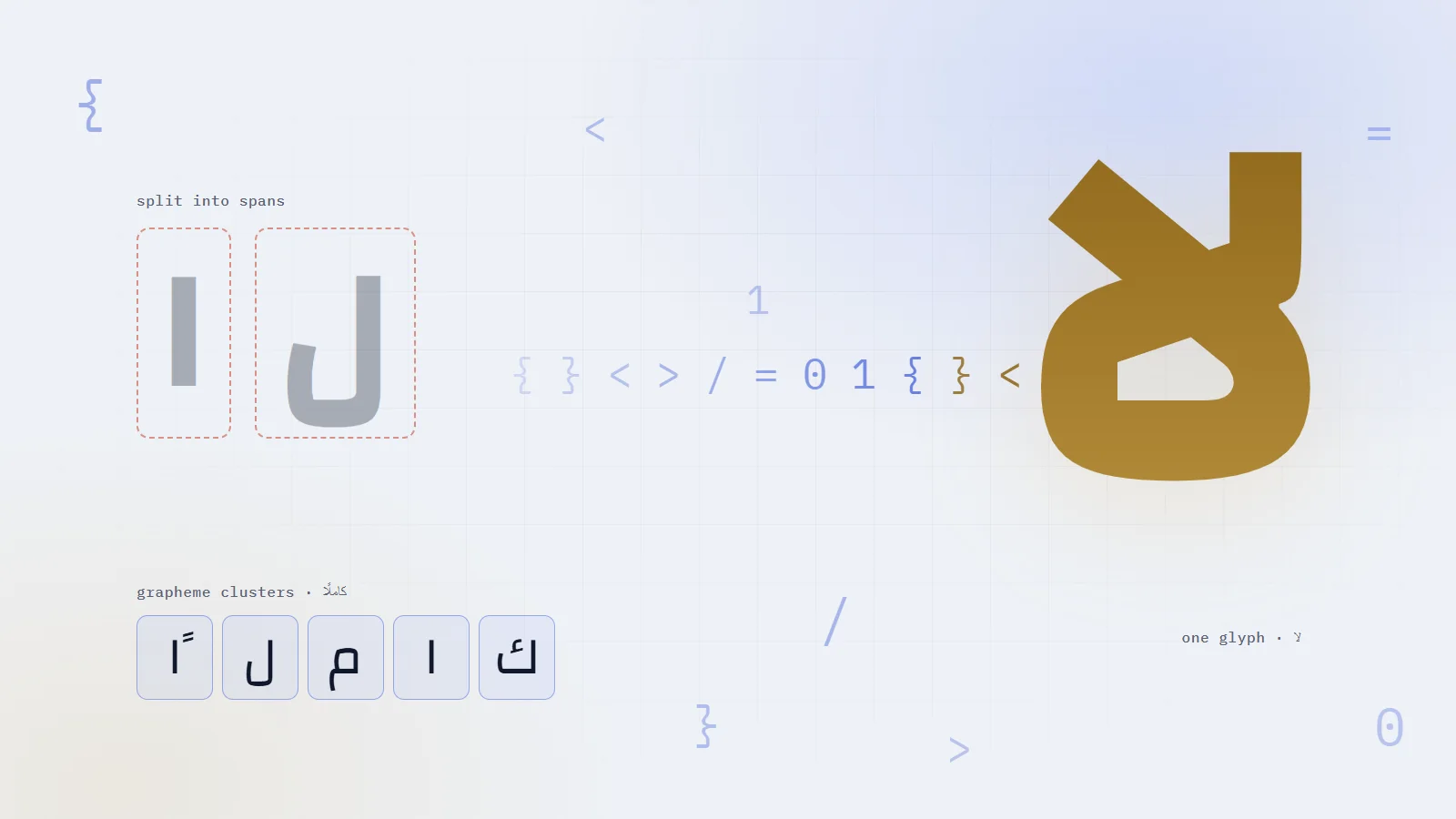
One span per letter split «لا» in my headline and doubled its gold sweep. Why grapheme clusters can't fix it, why words can, and a decode component that works in both scripts.
How I keep a 322,000-line accounting system correct on my own: one save gate, append-only money, a hash-chained audit trail, real-database tests, and the audit that caught what they missed.
Offline-first billing for electricity stations: one id from the phone to the receipt, why bill totals must never be added, an outbox that knows what to retry, and the 500 that looped.
It was an Xprinter XP-370B on a till in real use, loaded with 76 mm roll, and it fed paper until the roll ran out. Measured on the bench without printing, the job asked for 124.7 mm. The job was bounded. The printer was not.
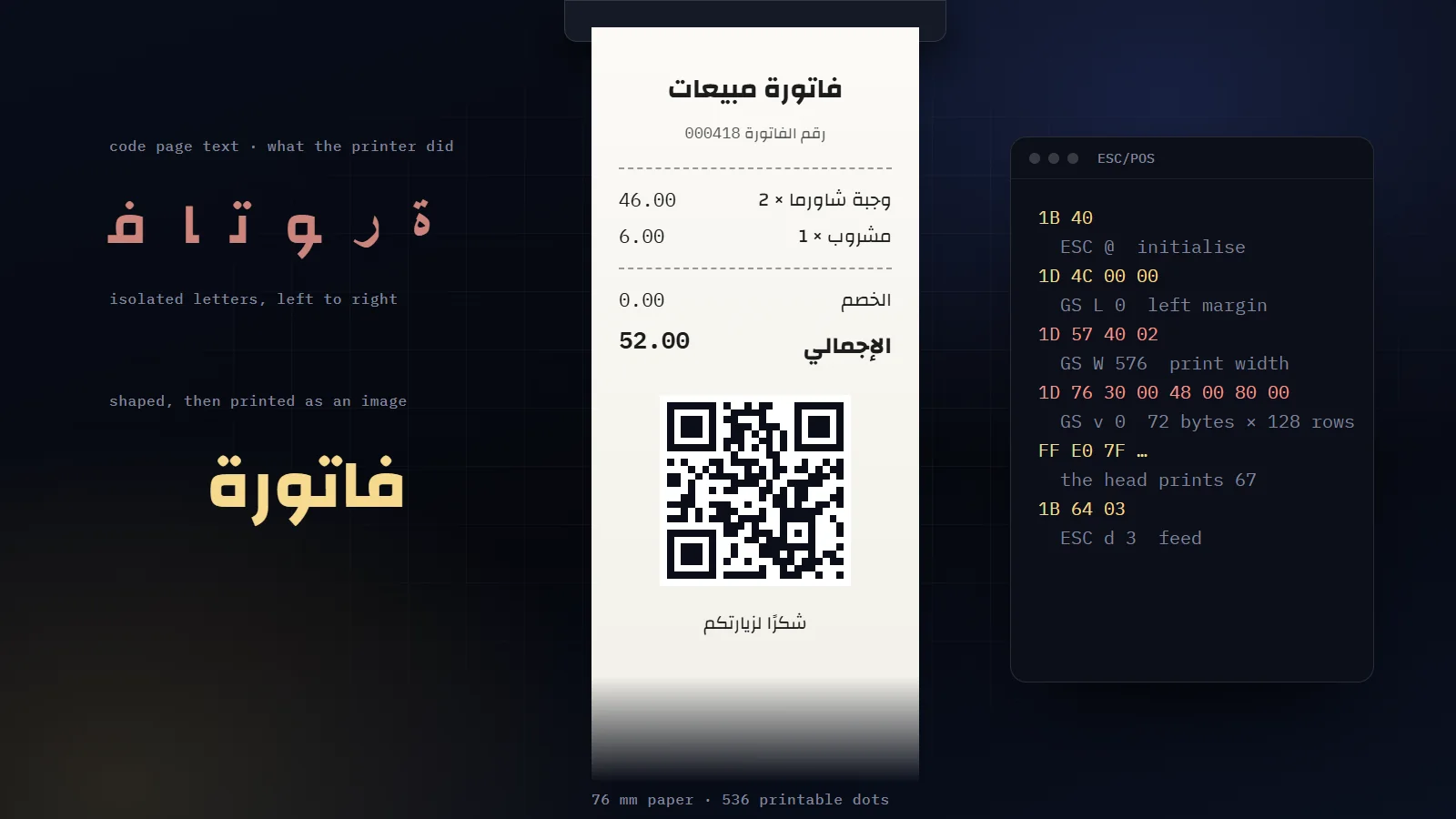
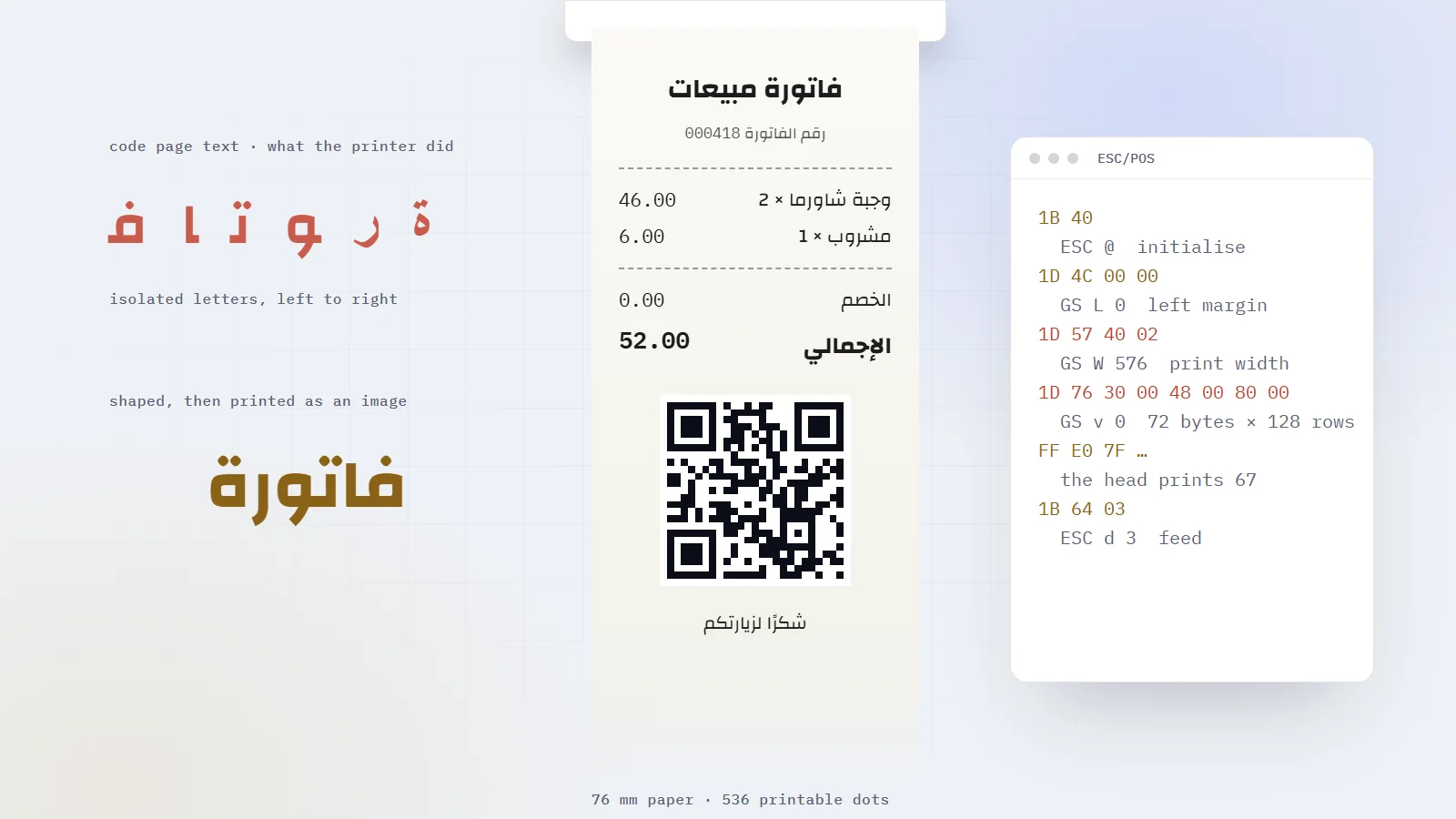
The cause was five bytes. Every row of the receipt image was 72 bytes wide, on a head that prints 67.
FinyX-ERP prints every receipt in Arabic, with a QR code at the bottom, on 203 DPI printers that cost little and forgive nothing. It never sends the printer a single Arabic character. By the end of this article you will be able to print clean Arabic on any ESC/POS printer, with a hard ceiling on paper, and you will know exactly how five bytes turn pixels into commands.
A receipt printer's text mode was built for Latin script: fonts in ROM, and code pages that map one byte to one glyph. Arabic asks for more. Each letter takes up to four shapes depending on its neighbours. Lam and alef fuse into one glyph. A line runs right to left while the numbers inside it run left to right. I wrote about those joining rules in why per-letter text effects break Arabic. Text mode does none of it.
In practice, firmware code pages disconnect the letters, reverse the run, or substitute glyphs that have nothing to do with Arabic, and two units of the same model can behave differently. I cannot support behaviour I cannot predict.
So in FinyX-ERP, Arabic never reaches a printer as text. The computer shapes it with a real text engine, the whole receipt becomes a black-and-white picture, and the printer only ever receives raster images. Barcode labels follow the same rule: on the TSPL label printers, the Arabic product name goes as a bitmap too.
203
dots per inch, one bit per dot
536
dots the head really prints on 76 mm paper
27 mm
of feed after the last line, sent as 216 dots
800 mm
the most paper one receipt may use
Pictures solve Arabic completely. They also carry the risk at the heart of this story, because to the printer a picture is just more bytes in the command stream.
QuestPDF composes the receipt right to left on a continuous page with no fixed height, exactly as wide as the print area. The page is rendered at 203 DPI, so one pixel is one printer dot, and from there it is bits all the way down.
Lay out the receipta QuestPDF page, right to left, 536 px wide
RenderPNG at 203 DPI: one pixel per printer dot
Thresholdink below 180, transparency composited on white
EncodeESC/POS raster bands of 128 rows
Send it RAWthrough the Windows spooler, never retried
Arabic never reaches the printer as text
The encoder is short. Three lines in it do the real work:
csharp
// Rec. 601 luma, in integer form.var luminance = (77 * red + 150 * green + 29 * blue) >> 8;// Composite transparent pixels onto white first. Without it, an unpainted// background reads as black and the receipt prints as a black rectangle.luminance = (luminance * alpha + 255 * (255 - alpha)) / 255;if (luminance < InkThreshold) // 180 raster[y * rowBytes + x / 8] |= (byte)(0x80 >> (x % 8));
Each dot is one bit, and the leftmost dot of a byte is its highest bit, so dot x lands in byte x / 8 under the mask 0x80 >> (x % 8). A row of 536 dots is 67 bytes. Hold on to that number.
The bands go out with GS v 0, 128 rows at a time. That command advances the paper by exactly the image height, so bands meet with no seam; a line feed between them would open a white stripe. Below the last inked row, everything except a margin of about 2 mm is dropped, so no hand's length of blank paper follows the receipt.
The spooler call is plain winspool with data type RAW, in 64 KB chunks. The Windows driver installed for this printer is a label driver, and RAW keeps it from turning ESC/POS into its own TSPL. If anything fails halfway, the code calls AbortPrinter and never retries: an ambiguous partial job sent twice can duplicate a receipt or empty the roll.
At 203 DPI a millimetre is about eight dots, and only at 203 DPI. So millimetres become dots in exactly one function, against the printer profile's own resolution, rounding half away from zero so that a barcode module never shrinks.
Paper
Print area
Head offset
58 mm
384 dots (48 mm)
0
80 mm
576 dots (72 mm)
0
76 mm, on the XP-370B I tested with
536 dots (67 mm)
24 dots
The first two are the generic profiles. The XP-370B numbers were measured: the paper is 607 dots wide, the head marks 536 of them, and the first 24 are mechanically out of reach. Using the full width clipped the right-hand column. On an Arabic receipt the right edge is where every line starts, which makes it the worst edge to lose.
76 mm paper607dots
What the head can print on it536dots
80 mm paper, printable576dots
58 mm paper, printable384dots
Paper width and print width are two different numbers (dots at 203 DPI)
The settings offer five print areas (384, 512, 536, 576 and 608 dots), and the default is the conservative 536. A narrower area always prints. A wider one is what breaks things, and soon you will see how badly.
The biggest quality gain came from one decision. My first receipts were composed 80 mm wide and scaled down to 536 dots by the encoder, a factor of 0.84. Scaling a 1-bit image is what makes Arabic look ragged: a shrunken stroke lands between dots, and the threshold has to guess. Now the page is composed at the print area itself:
csharp
// 536 dots at 203 DPI = 67.07 mm. One PDF pixel becomes one printed dot.internal static float PageWidthMm(DocumentPrintSettings settings) => (float)(settings.ReceiptPrintAreaDots * 25.4d / RasterDpi);
That 536 came from a roll on the floor, and we will get there. First, the Arabic itself needs rules, because one bit per dot is a harsh medium.
A 203 DPI head has no grey. Each dot burns or it does not, and a stroke thinner than one dot simply does not print. Four rules follow from that.
Choose the font by test. I rendered the same invoice in Ping AR + LT and in Cairo at real size, through the same threshold, and compared. Ping is narrower and more regular, so a line fits a longer item name, and its stems stay a full dot wide at 7.5 pt. Cairo starts to crumble at those sizes. Ping became the thermal default.
Medium weight for body text. At 8 pt, the joins of a regular weight drawn for backlit screens fall below one dot and break, which reads as a ragged letter.
A floor of 6.5 pt. That is about 18 dots tall. Below it, the dots that tell ب from ت from ث start merging into the letter.
No colour and no grey. Everything collapses to black or white at the threshold, so a light shaded band prints either nothing or a black block over its own text. The document title is white text reversed out of a solid black band.
Body text is 8 pt, labels 7.5 pt, the grand total 13 pt. Sizes that small work only because nothing is scaled on the way to the head.
With an Arabic culture, the text stack swaps in Arabic-Indic digits, so 76,400.00 prints as ٧٦٬٤٠٠٫٠٠. Readable, but a customer compares the price with a shelf label and a supplier reads barcode numbers back, and both want Western digits. So Western digits are the default and Arabic-Indic is a setting. In the WPF renderer that draws labels, the switch is one object:
A date with a time, such as 2026/09/08 14:35, holds two Latin runs. Inside an Arabic paragraph they are laid out right to left, so the time reaches the paper before the date. Values like that go inside a left-to-right isolate:
csharp
// U+2066 LEFT-TO-RIGHT ISOLATE … U+2069 POP DIRECTIONAL ISOLATEinternal static string Ltr(string value) => string.IsNullOrEmpty(value) ? value : $"{value}";
An isolate fixes the character order and leaves placement to the right-to-left flow. A left-to-right container would also push the value to the left edge of its cell.
Never put Arabic text inside the isolate: in there, the Yemeni rial symbol «ر.ي» reverses its letters. So currency prints as its ISO code (YER, SAR), once, on the grand total. Two bugs from this family reached paper. A payment line built without the isolate printed YER 75,000.00 reversed, and a negative balance printed as 50,000.00- because the minus sign sat outside the isolate. Both now go through one formatter.
Shaped, sized and ordered, the receipts finally looked right. Then a till in real use printed one and kept going.
The first theory looked solid. The driver advertised 38.1 mm media while the receipt was 76 mm wide, so the printer seemed stuck in label mode, hunting for a gap that continuous paper does not have.
I disproved it with a PowerShell script. It sent raw ESC/POS to the same printer with the same settings, printed one clean copy, and stopped. A RAW job bypasses the driver completely, so the driver's media size could not be the cause. The difference had to be in the bytes.
So I measured the job without sending it. A diagnostic runs the real composer and encoder and writes out the command stream instead of paper:
text
QuestPDF: 1 page, 639 × 1037 px = 129.8 mmESC @ · ESC a 1 · GS L 0 · GS W 576 · 8 × GS v 0 (72 bytes × 128 rows) · ESC d 3paper requested: 124.7 mm
Twelve centimetres, and not one stray byte. What differed from the working script was the geometry:
Script that worked
FinyX-ERP before the fix
GS L, left offset
24 dots
0
GS W, print area
536 dots
576
Raster row
67 bytes = 536 dots
72 bytes = 576 dots
Alignment
none
ESC a 1
Ending
ESC J 240, feed in dots
ESC d 3, feed in lines
There are the five bytes. At offset zero, 576 dots is wider than this head prints on 76 mm paper. Given raster rows wider than its print area, the firmware resynchronises mid-image, and from then on it reads image bytes as commands. Raster data is full of bytes that mean "feed". That is how a 12 cm receipt becomes a roll on the floor.
ESC d made it worse. It feeds in lines, and some label-capable firmware reads it as "advance to the next form", which continuous paper never has.
BeforeAfter
GS L 0, GS W 576GS L 24, GS W 536
72 bytes per raster row67 bytes per raster row
Rows wider than the printable bandRows that fit the band exactly
Firmware resyncs and reads image bytes as feedsThe receipt ends at 134.9 mm
How a 12 cm receipt turned into a roll on the floor, and the fix
The fix had three parts:
Every raster row is exactly as wide as GS W declares, rowBytes = printAreaDots / 8, and anything beyond is cropped. Printer and encoder can never disagree on the byte count, and a test asserts rowBytes × 8 == width exactly.
ESC J in dots replaces ESC d, split into steps of at most 255 because it takes a single byte.
ESC a 1 is gone. The raster fills the whole area, so alignment only added another way for the two sides to disagree.
After the fix, the stream matches the working script command for command:
text
ESC @ · GS L 24 · GS W 536 · 7 × GS v 0 (67 bytes × 128 rows) · ESC J 216paper requested: 134.9 mm
Then I made sure the next layout fault would end as an error message. A receipt may use at most 800 mm of paper, feed included, checked before the first byte leaves; the old ceiling was 40,000 rows, about five metres. A button in the printing settings empties the printer's queue, and a script does the same without the app:
powershell
# Pause the queue so nothing new starts, then cancel what is already in it.Add-Type -AssemblyName System.Printing, ReachFramework$server = New-Object System.Printing.LocalPrintServer$queue = $server.GetPrintQueues() | Where-Object FullName -eq 'Xprinter XP-370B'$queue.Pause(); $queue.Commit()foreach ($job in $queue.GetPrintJobInfoCollection()) { $job.Cancel(); $job.Dispose() }
Know its limit. Paper already moving comes from the printer's own buffer and stops when that drains. If it keeps going after that, the printer is feeding on its own, and only the power switch or the media setting will stop it.
The same error log held a second way to waste a roll. Process.Start with the print verb sends a PDF to the Windows default printer. On a till where that is the thermal printer, an A4 page goes through the thermal driver onto a roll with no page length. Now the PDF opens, and a person picks the printer.
The QR. The QR is drawn as SVG: one square per module, shape-rendering="crispEdges", no smoothing. A raster QR that gets resized has modules that bleed into each other, and scanners give up. A vector is drawn straight onto the printer's own grid.
csharp
var matrix = new QRCodeWriter().encode(content, BarcodeFormat.QR_CODE, 0, 0, new Dictionary<EncodeHintType, object> { [EncodeHintType.ERROR_CORRECTION] = ErrorCorrectionLevel.M, [EncodeHintType.MARGIN] = 0, // the quiet zone is added by hand: 4 modules });// then one "M x,y h1v1h-1z" square per dark module
Error correction is level M. The receipt's QR carries about 550 characters, level H would make it too big to print at a readable size, and M survives an ordinary scratch or ink spot. It prints 38 × 38 mm, centred between the totals and the footer.
The feed. After the last line the paper advances 27 mm, so the footer clears the tear bar. ESC J counts motion units, one dot on these printers, so 27 mm is 216 dots.
The cut. Only when the printer has a cutter, because a cut sent to one without a cutter jams it or prints as characters. The XP-370B's driver offers None, Tear Off and Peel Off, and no Cut, so the cashier tears. Elsewhere, GS V makes one partial cut after the whole receipt. The live path still recognises the XP-370B by name; the profile-driven encoder I am moving to reads the cutter from the printer's profile.
The drawer.ESC p pulses the cash drawer. It lives in the profile-driven encoder and is off by default, because a pulse on a printer wired to something else is at best a click.
Measure the print area on the real printer, keep it per printer, and declare it in every job with GS L and GS W.
Make every raster row exactly printAreaDots / 8 bytes, and crop anything wider.
Compose at the final width. Never scale a 1-bit image.
Composite transparency onto white before the threshold.
Feed in dots with ESC J, and cap the paper before sending anything.
Preview the bits the head will burn. My preview tool runs pages through the real encoder and saves PNGs; it caught wrapping, reversed text and extra length before they cost paper.
Never retry a print automatically.
Once Arabic became pixels, every problem left was geometry: how wide to print, how far to feed, where to stop. Five bytes of it cost a whole roll.


Comments
Join the conversation
Sign in with Google to like articles and comment. It takes one tap.