Per-letter text effects break Arabic. Intl.Segmenter won't save you
One span per letter split «لا» in my headline and doubled its gold sweep. Why grapheme clusters can't fix it, why words can, and a decode component that works in both scripts.
Why ESC/POS printers mangle Arabic, how to print it as a 1-bit image at the head's exact width, and the geometry bug that turned a 12 cm receipt into a roll on the floor.
How I keep a 322,000-line accounting system correct on my own: one save gate, append-only money, a hash-chained audit trail, real-database tests, and the audit that caught what they missed.
Offline-first billing for electricity stations: one id from the phone to the receipt, why bill totals must never be added, an outbox that knows what to retry, and the 500 that looped.
The English headline decoded beautifully. Code glyphs flickered ahead of a cursor, and each letter landed in place behind it.
Then I switched the page to Arabic.
Before the effect had even finished, my eye caught on one word: «كاملًا». The «لا» at its end, a shape every Arabic reader knows at a glance, stood there as two separate letters. A second later the gold sweep passed over the headline, and every word looked doubled.
One word, two bugs, and a third across the whole line. The fix every developer reaches for, Intl.Segmenter, cures exactly one of them.
And when I rebuilt the bug on a test page for this article, it got stranger. The same spans were fine in an ordinary paragraph. It took one CSS property on my headline to break them.
By the end you'll know which property, why the word is the smallest unit you can safely animate in Arabic, how to hand the line back so anything layered on it lines up to the pixel, and you'll have a component you can paste.
One part of this is right, and it stayed. Every character is in the DOM from the first frame, so the line already has its final width and wraps where it will wrap. Nothing reflows while the effect runs.
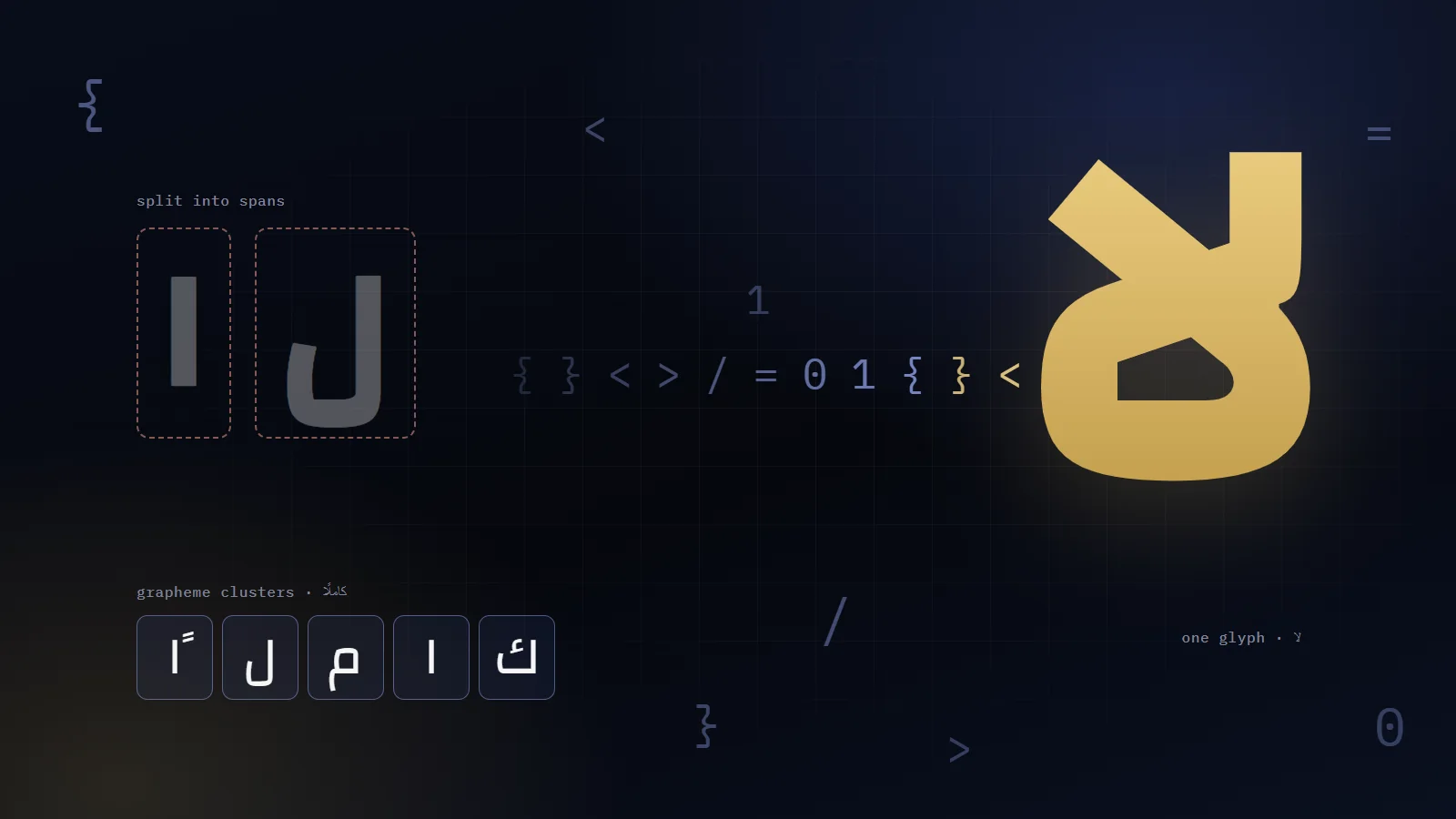
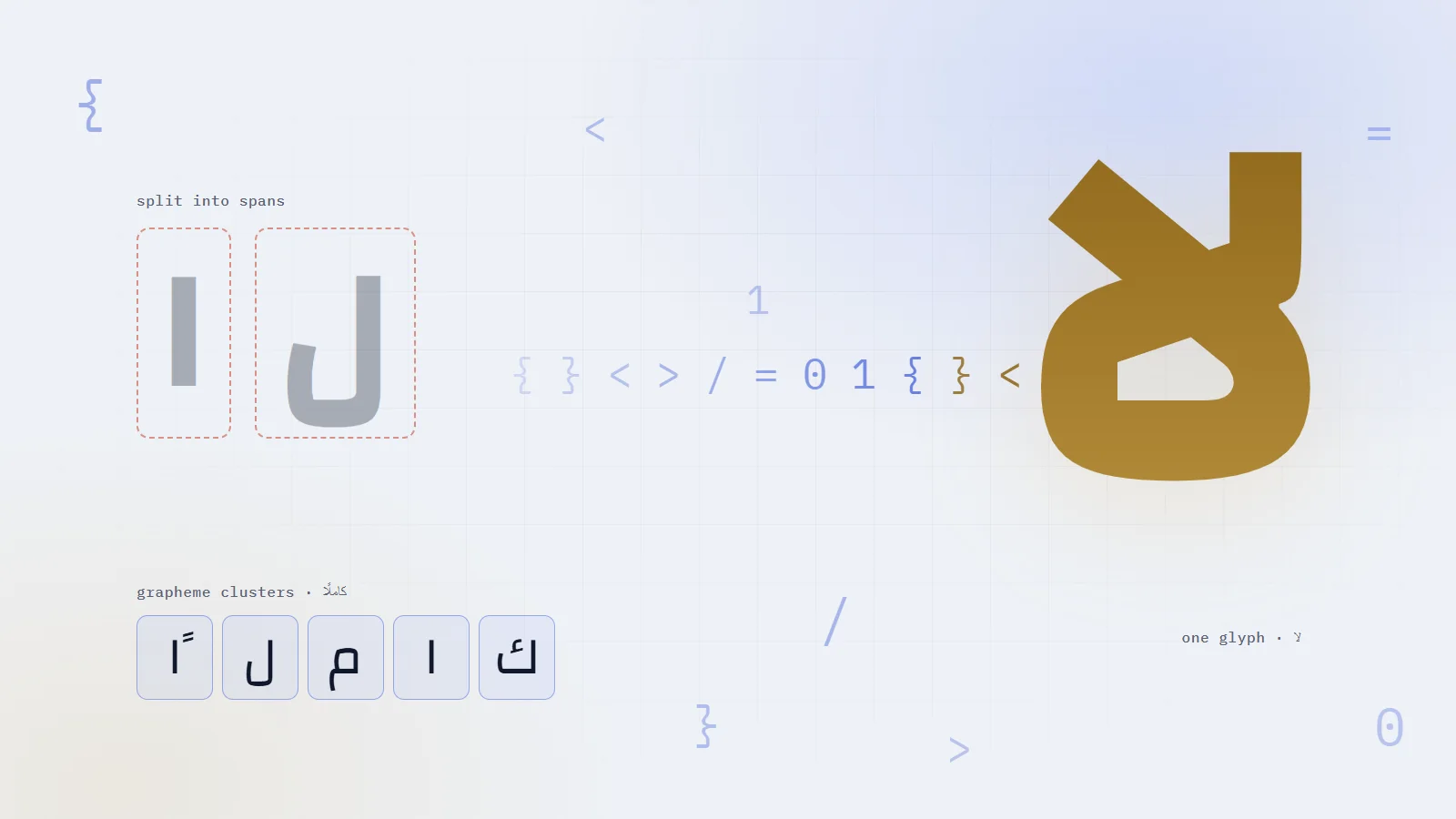
Array.from() splits a string by code point. «كاملًا» has six:
js
const hex = (s) => [...s].map((c) => c.codePointAt(0).toString(16).toUpperCase().padStart(4, '0'))hex('كاملًا')// ['0643', '0627', '0645', '0644', '064B', '0627'] six code points, six spans
That 064B is the tanween, the mark that sits on the lam. As its own code point it got its own span, separated from the letter it belongs to.
Don't assume your strings are free of marks. Interface Arabic drops most of them, but tanween on adverbs like «كاملًا» and «أيضًا» is standard spelling, and a shadda turns up in names like «محمّد».
What a reader sees as one character is a grapheme cluster, and the browser can segment those for you:
js
const seg = new Intl.Segmenter(undefined, { granularity: 'grapheme' })Array.from(seg.segment('كاملًا'), (part) => hex(part.segment).join('+'))// ['0643', '0627', '0645', '0644+064B', '0627'] five graphemes: the mark rides with its lam
Bug 1, fixed. Now look at the last two entries.
#Bug 2: «لا» split in two, and Intl.Segmenter can't stop it
0644+064B is the lam with its mark. 0627 is the alef. Two graphemes, so still two spans.
Lam followed by alef is the one ligature Arabic requires. Unicode keeps the finished shape only for compatibility (ﻻ, U+FEFB). Real text stores two letters, and the font draws a single shape when it shapes them together.
Grapheme clusters describe what a reader perceives as one character. The ligature is bigger than that: two characters the font fuses into one glyph. No grapheme split can keep it whole, because it spans two graphemes.
So when does the split actually show? I rebuilt the headline on a test page (IBM Plex Sans Arabic at weight 600, in Chrome 153 and Edge 155, which agreed to the pixel) and measured the line in four setups:
Text as
Extra CSS
«لا»
Widest line
Plain text
text-wrap: balance
one glyph
415.7px
A span per word
text-wrap: balance
one glyph
415.7px
A span per grapheme
none
one glyph
within 0.4px of plain
A span per grapheme
text-wrap: balance
two letters
458.9px
A span per grapheme
display: inline-block
two letters, no joins at all
33% wider
In an ordinary line, Chrome shapes across inline spans and the word survives. My headline had text-wrap: balance, and with it the same spans lost the ligature, several joins, and 43 pixels of width. The inline-block row is what you get from any effect that moves letters one by one, since a transform needs a box: every letter stands alone.
Even in the case that survives, there's a catch. With my font, the ligature is a single glyph, and Chrome paints it in the colour of the lam's span. In my test, the whole «لا» appeared the moment the lam landed, and while the lam was still transparent the alef was invisible too. Half a glyph can't be animated.
My headline has a gold sweep on top: a second, plain-text copy of the headline, revealed by a moving band. Plain text and spans now disagreed by 43 pixels on the widest line, so they spaced and balanced differently, and the gold letters no longer sat on the white ones.
Plain text (the gold copy)415.7px
One span per word415.7px
One span per grapheme458.9px
Width of the Arabic headline's widest line, with text-wrap: balance
A span per characterA span per word, then plain text
«لا» drawn as two letters«لا» stays one glyph
The tanween in a span of its ownMarks stay on their letters
The line shaped across spansThe line shaped as plain text
The gold sweep doubledThe sweep sits exactly on the text
A word is the smallest piece of Arabic that carries its own shaping: its joins, its marks and its ligatures. So Arabic decodes word by word. English keeps character-by-character decoding, which reads well in Latin script and costs nothing extra.
ts
const ARABIC = /\p{Script=Arabic}/uconst byWord = ARABIC.test(text)// Spaces stay as plain text between the words.const units = byWord ? text.split(/( )/).filter(Boolean) : graphemes(text)
My site tests for the main Arabic block, U+0600 to U+06FF, which covers its strings. \p{Script=Arabic} is the safer choice for text you don't control: it also matches the supplement and extended blocks and the presentation forms.
A string with any Arabic in it goes by word, Latin words included. «مهندس برمجيات Full Stack» decodes as four words.
The rhythm needed two adjustments, both in the component below:
Latin scriptArabic script
One grapheme per stepOne word per step
20 ms per step60 ms per step: three steps per word
One glyph while waiting2 to 7 glyphs, about the word's length
My headline: 49 charactersMy headline: 8 words
Same effect, two units
A word takes three steps, so it doesn't flash past in the time of a single letter. And while it waits, it shows a short burst of glyphs about its own length, so the line keeps its texture.
Per-word spans match plain text to within 0.03px on my test page. Plain text matches it exactly, with one text node in place of a span per word. So when the effect ends, the spans go away entirely.
The last unit landsthe requestAnimationFrame loop stops
200 ms laterthe spans are swapped for one plain string
onSettled firesReact adds .is-decoded to the headline
The gold sweep startsit was paused until now
How the headline hands itself back
The settled headline is now shaped exactly like plain text, ligatures and all, and the gold sweep, also plain text, lines up with it pixel for pixel.
tsx
if (settled) return <span className="decode is-done">{text}</span>
The sweep waits for that moment with a class, never a :has(). Why a :has() there doubled my idle CPU is in the performance article.
The sweep itself is two transforms. A band 30% of the headline wide slides one way, and inside it a full-width plain-text copy slides back by the same distance on the same clock, so the gold letters stay on the white ones. Its geometry uses physical left on purpose. In Arabic, only the text inside should flip. The band's path stays put.
The decode runs right to left in Arabic without a single special case.
The units are in DOM order, which is logical order: the order you type and read. Index 0 is the first word a reader sees, on the right. The loop walks the indexes, so the cursor moves the way the reader's eye does.
The glyph overlay needs no direction rules either. It sits at left: 50% with translate: -50% 0, centred on its unit in either direction.
Numbers are the one place to be explicit. Digits inside Arabic text run left to right, so the figures under my headline sit in their own dir="ltr" elements and decode through digit glyphs instead of code symbols.
This effect runs a requestAnimationFrame loop, which my performance article treats as a warning sign. The difference is that this loop ends.
One loop per text, touching only the units inside the scrambling window. It breaks out at the first unit beyond the window, and it stops when the last one lands.
New glyphs every 60 ms, about 16 a second: fast enough to read as noise, slow enough to see the symbols.
Only the units scrambling at that moment get position: relative, which the glyph needs. A positioned span becomes its own paint layer, and a hundred of them made every frame of the decode heavy.
Burst lengths for Arabic words are worked out once. Running Intl.Segmenter on every shuffle for every waiting word showed up in the profile.
With reduced motion, the text settles at once.
Measured A/B on a phone profile with the CPU slowed four times, the whole effect costs about 0.35 s of main-thread work spread over the first two seconds, and nothing after that.
Here is the component from my site, trimmed to the parts that matter. It needs TypeScript's ES2022 lib or later for Intl.Segmenter, and it falls back to code points where the browser lacks it.
tsx
import { useEffect, useMemo, useRef, useState } from 'react'const GLYPHS = '{}[]()<>/=+-*&|!?#$%@;:01λΣ'const ARABIC = /\p{Script=Arabic}/u/** User-perceived characters, so a letter keeps its marks. */const graphemes = (text: string): string[] => typeof Intl.Segmenter === 'function' ? Array.from(new Intl.Segmenter(undefined, { granularity: 'grapheme' }).segment(text), (s) => s.segment) : Array.from(text)type Props = { text: string delay?: number // ms before the first unit starts step?: number // ms per character; an Arabic word takes three steps window?: number // how many units ahead of the cursor are scrambling onSettled?: () => void}export default function DecodeText({ text, delay = 0, step = 20, window: span = 5, onSettled }: Props) { const ref = useRef<HTMLSpanElement>(null) const onSettledRef = useRef(onSettled) useEffect(() => { onSettledRef.current = onSettled }) const byWord = ARABIC.test(text) // Arabic by word (spaces stay plain text between words), anything else by grapheme. const units = useMemo(() => (byWord ? text.split(/( )/).filter(Boolean) : graphemes(text)), [text, byWord]) const [settledText, setSettledText] = useState<string | null>(null) const settled = settledText === text useEffect(() => { const root = ref.current if (!root || settled) return const cells = Array.from(root.querySelectorAll<HTMLElement>('.dc')) const settle = () => { setSettledText(text) onSettledRef.current?.() } if (window.matchMedia('(prefers-reduced-motion: reduce)').matches) { settle() return } const noise = (n: number) => Array.from({ length: n }, () => GLYPHS[(Math.random() * GLYPHS.length) | 0]).join('') // A word's burst is about its own length: worked out once, never per shuffle. const burst = cells.map((c) => (byWord ? Math.min(7, Math.max(2, graphemes(c.textContent ?? '').length)) : 1)) const pace = byWord ? step * 3 : step const start = performance.now() + delay let raf = 0 let timer = 0 let lastShuffle = 0 const tick = (now: number) => { const t = now - start const shuffle = now - lastShuffle > 60 // about 16 new glyphs a second if (shuffle) lastShuffle = now let landed = 0 for (let i = 0; i < cells.length; i++) { const cell = cells[i] const at = i * pace if (t >= at) { if (!cell.classList.contains('is-on')) { cell.classList.remove('is-scr') cell.classList.add('is-on') } landed++ } else if (t >= at - span * pace) { if (shuffle || !cell.classList.contains('is-scr')) { cell.dataset.g = noise(burst[i]) cell.classList.add('is-scr') } } else break // everything after this is still waiting } if (landed < cells.length) raf = requestAnimationFrame(tick) else timer = window.setTimeout(settle, 200) // then hand back plain text } raf = requestAnimationFrame(tick) return () => { cancelAnimationFrame(raf) window.clearTimeout(timer) } }, [text, units, byWord, delay, step, span, settled]) const className = settled ? 'decode is-done' : 'decode' // Settled: one plain string, shaped like any other text on the page. if (settled) return <span className={className}>{text}</span> // Keyed by the text, so a language switch mounts fresh, hidden units. return ( <span key={text} ref={ref} className={className}> {units.map((unit, i) => (unit === ' ' ? ' ' : <span key={i} className="dc">{unit}</span>))} </span> )}
css
.dc { color: transparent; }/* Only while scrambling: a positioned span is its own paint layer. */.dc.is-scr { position: relative; }.dc.is-scr::after { content: attr(data-g); position: absolute; top: 0; left: 50%; translate: -50% 0; /* centred on its unit, in either direction */ white-space: nowrap; font-family: ui-monospace, monospace; color: #d6b56d;}.dc.is-on { color: inherit; }
A decode only changes colour, so it can live with inline spans. Effects that move letters need a box per piece, and as the table showed, an inline-block per letter leaves every Arabic letter standing alone.
Move words instead. Arabic letters never join across a space, so a box per word costs nothing in shaping. The paragraph under my headline streams in this way, one word rising a few milliseconds after the one before:
tsx
import { Fragment, type CSSProperties } from 'react'/** Each word rises into place a few ms after the one before. Words stay whole, so Arabic keeps its joins. */export function StreamText({ text, delay = 0, step = 14 }: { text: string; delay?: number; step?: number }) { return ( <> {text.split(' ').map((word, i) => ( <Fragment key={`${text.length}-${i}`}> {i > 0 && ' '} <span className="sw" style={{ ['--sw' as string]: `${delay + i * step}ms` } as CSSProperties}> {word} </span> </Fragment> ))} </> )}
It's one-shot CSS, opacity and transform only, with no script after the first render. Punctuation stays glued to its word, since the split is on spaces: «كاملًا،» rises as one piece with its comma.


Comments
Join the conversation
Sign in with Google to like articles and comment. It takes one tap.