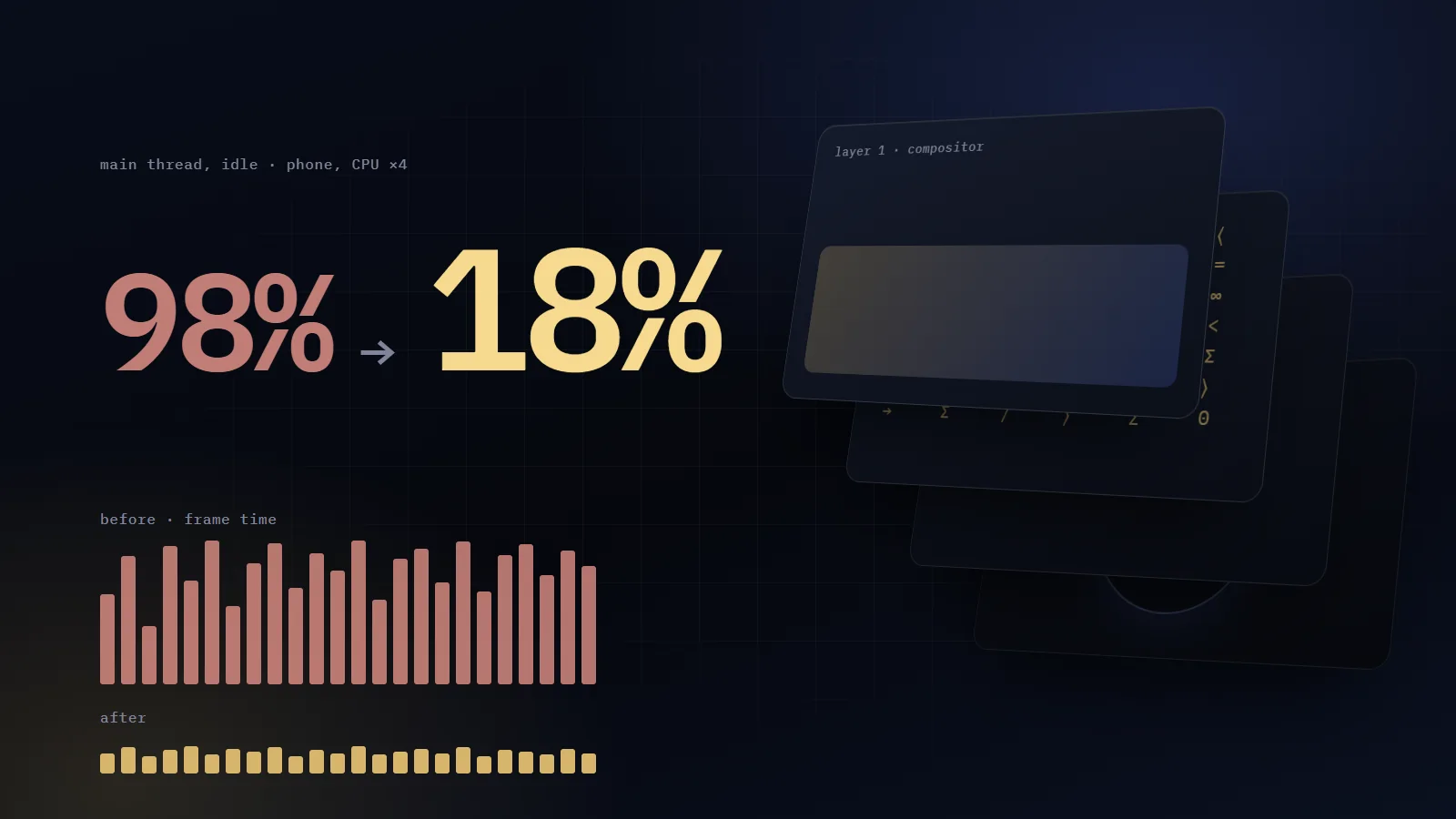
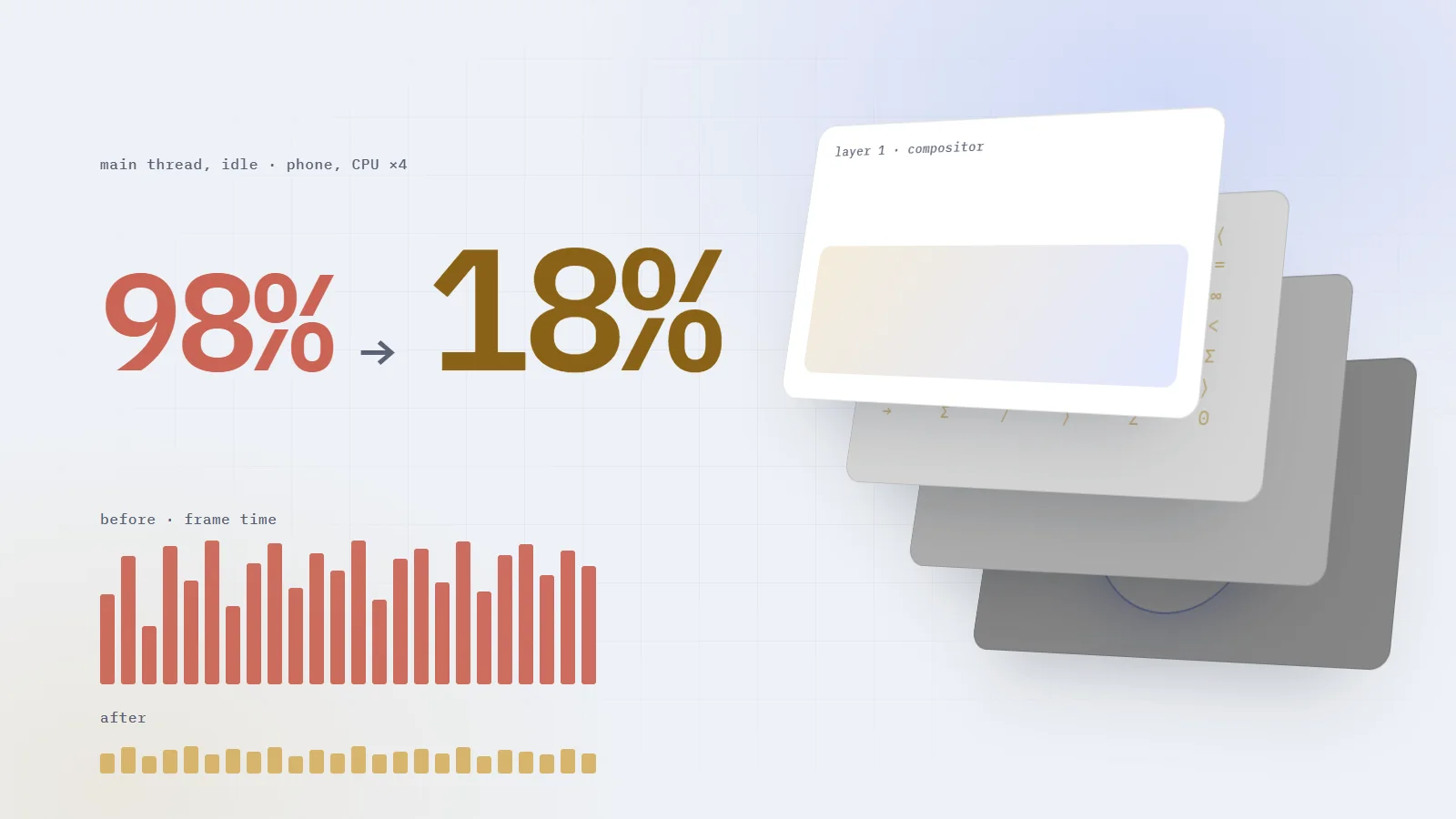
200 animations kept my main thread 98% busy at rest. None had to go
One animation the GPU can't run makes the browser redo the whole page every frame. The five that did it to my site, the trace field that names them, and the fixes: 98% to 18%.
How I keep a 322,000-line accounting system correct on my own: one save gate, append-only money, a hash-chained audit trail, real-database tests, and the audit that caught what they missed.
Why ESC/POS printers mangle Arabic, how to print it as a 1-bit image at the head's exact width, and the geometry bug that turned a 12 cm receipt into a roll on the floor.
Offline-first billing for electricity stations: one id from the phone to the receipt, why bill totals must never be added, an outbox that knows what to retry, and the 500 that looped.
On my desktop the page looked finished. Runes fell behind the text, a terminal typed real commands, rings of code turned behind my portrait, phones swayed in 3D.
On a phone, the same page stuttered.
I expected a heavy image or a fat bundle. Chrome showed me something stranger: with nobody touching the screen, the main thread was busy 98% of every second.
So I started switching animations off to find the guilty one. Nothing changed. That dead end turned out to be the best clue of the whole hunt.
By the end of this article you'll know why one animation can tax all the others, how to make Chrome name the one doing it, and you'll have two scripts that measure it for you.
The test was simple. Load the page in a phone profile (390×844, 3× pixel density, CPU slowed 4×), let it finish loading, touch nothing, and ask Chrome how much of each second the main thread spent running tasks.
Phone profile, before98%
Phone profile, after18%
Desktop, before43%
Desktop, after8%
Share of each second the main thread was busy, page at rest
At 98%, every tap and every scroll queues behind work the user can't see. The page looks alive and feels dead.
Frames per second hid all of it. Most of my motion ran on the compositor, a separate thread that kept moving layers smoothly while the main thread drowned. The FPS meter was measuring the healthy thread.
The number comes from one DevTools Protocol metric, TaskDuration: the total seconds the main thread has spent on tasks. Read it, wait three seconds, read it again, divide. The full script, with A/B runs and medians, is near the end.
One warning before any number: my machine was often busy with other work, so single runs lied. Every comparison in this article was A/B, interleaved, and the median of several runs.
#The clue: switching animations off changed nothing
I turned animations off in groups. Removed the canvas: 98%. Removed the rings: 98%.
No single group mattered, so I was asking the wrong question. The cost behaved like a fixed fee, and a few animations were making the whole page pay it.
One animation needs the main threada canvas loop, a setState, a background-position
Chrome schedules a main-thread frameon every vsync
The page does its rendering workstyle, layout bookkeeping, paint, layer updates
Taps and scrolls waitbehind work nobody can see
How one animation taxes the whole page
A composited animation is a layer the GPU moves on its own. The main thread hands it over once and goes quiet. A non-composited animation needs the main thread to produce a fresh frame every time the screen refreshes, and that frame is a full one: style, layout bookkeeping, paint and layer updates, for the whole page.
So 200 animations, most of them already on the GPU, paid that fixed cost because a handful of others kept asking for a frame. Removing one group did nothing while another was still asking.
The real question became: what forces a main-thread frame? I listed six suspects and replaced every one of them. When I re-tested each alone, five were guilty and one was innocent. The first had a comment at the top of its file promising it would cost almost nothing.
#The six suspects I chased, and what replaced each
BeforeAfter
A canvas redrawn from requestAnimationFrame26 glyph columns moved by transform
setState for every typed characterFour nested layers stepping by transform
A light sliding by background-positionA rule that draws itself with scaleX and opacity
Opacity on an element inside an SVGAn HTML caret laid over the SVG
A conic border spun by @propertyA rotating gradient under a mask that never moves
Two transform animations on one elementOne per nested wrapper
The six suspects, and what each one became
#1. The canvas that was "built to cost almost nothing"
That's what the old file said, and it looked responsible. The rune rain was one transparent canvas at CSS pixel size, capped at 24 frames a second on phones and 30 on desktop, paused when the tab was hidden.
Here is its loop:
ts
const tick = (t: number) => { raf = requestAnimationFrame(tick) if (t - last < frameMs) return // too soon: skip this frame last = t draw()}
The skip is the trap. Every one of those callbacks, including the ones that return at once, is a request for a main-thread frame. The frame cap saved drawing time and nothing else.
The replacement draws nothing at runtime. Twenty-six columns of glyphs, each string picked once from a fixed seed (so the prerendered HTML and the browser agree), each one moved down by a CSS transform:
css
.rune-col { position: absolute; top: 0; left: var(--x); width: 1ch; word-break: break-all; /* one glyph per line: a column */ mask-image: linear-gradient(transparent, #000 80%); /* the tail fades */ transform: translate3d(0, -110%, 0); animation: rune-fall var(--dur) linear infinite; animation-delay: var(--delay); /* negative: already falling on first paint */}@keyframes rune-fall { to { transform: translate3d(0, calc(100vh + 10%), 0); }}@media (max-width: 760px) { .rune-col:nth-child(2n) { display: none; } /* half the streams on a phone */}
Each column gets its own --x, a duration between 11 and 24 seconds, and a negative delay. Same look. Zero script per frame.
The terminal typed by calling setState on a timer: every 42 to 82 ms while typing, every 18 ms while erasing. Each call meant a render, a style recalculation and a layout, because the text changed width every time.
Now the typing is pure CSS. A window one character wider than the command slides in one-character steps, while the text inside it slides back by the same amount. Each letter appears exactly where it stands, and only transforms move.
.twslides the window in, one character per step
.tw-windowclips, then slides back out to erase
.tw-text-outslides the text back while erasing
.tw-textslides the text back while typing, so letters stay put
import type { CSSProperties } from 'react'const TYPE_MS = 55const ERASE_MS = 18const HOLD_MS = 1700export function TypeLine({ text }: { text: string }) { const timing = { ['--steps' as string]: text.length + 1, // one step per character, one for the caret ['--type' as string]: `${text.length * TYPE_MS}ms`, ['--hold' as string]: `${HOLD_MS}ms`, ['--erase' as string]: `${text.length * ERASE_MS}ms`, } as CSSProperties // The key remounts the layers, so a new command restarts every animation. return ( <span key={text} className="tw" style={timing}> <span className="tw-window"> <span className="tw-text-out"> <span className="tw-text">{text}</span> </span> <span className="caret" /> </span> </span> )}
It needs a monospace font, since every step is 1ch. Swap the text after text.length * (TYPE_MS + ERASE_MS) + HOLD_MS plus a short gap. That's one setState every few seconds, down from dozens a second.
Look at those four layers. The first CSS version had fewer, and that is cause number six.
Every section label had a gold rule with a light running along it: a gradient three times wider than the rule, animated with background-position. The compositor can't move a background inside an element, so it meant a repaint every frame, for every label.
css
/* Before: a repaint every frame */.eyebrow::before { background: linear-gradient(90deg, var(--gold) 0 35%, var(--gold-fill-2) 50%, var(--gold) 65% 100%); background-size: 300% 100%; animation: rule-scan 3.4s linear infinite;}/* After: the rule draws itself out and back */.eyebrow::before { transform-origin: left center; animation: rule-draw 3.4s ease-in-out infinite alternate;}html[dir='rtl'] .eyebrow::before { transform-origin: right center; /* grow from the side the text starts on */}@keyframes rule-draw { from { transform: scaleX(0.35); opacity: 0.55; } to { transform: none; opacity: 1; }}
It's a different effect, a rule that breathes in and out, and it costs nothing per frame.
#4. The innocent suspect: a blinking line inside an SVG
The cursor under the M in my logo blinked with opacity on a path inside the SVG. I believed that repainted the SVG on every frame, so I moved the blink to an HTML element laid exactly where the SVG would draw it. The numbers come from the SVG's own geometry: a 16-unit line with 2.6-unit round caps, in a 64-unit viewBox drawn at 30px, is (16 + 2.6) × 30 ÷ 64 = 8.7px wide.
Then, for this article, I re-tested every suspect on its own page. The old logo, blinking alone, caused no main-thread frames in Chrome 153 or in Edge 155, and the trace reported no failure for it. This one was innocent.
The HTML caret stays, since opacity on an HTML element is exactly the case the compositor is built for. The lesson is the part worth keeping: test each suspect alone, or you will credit a fix that did nothing.
The contact form had a light travelling round its border: a conic gradient whose angle was a registered custom property, animated from 0 to 360 degrees.
css
/* Before: computed on the main thread every frame */@property --spin { syntax: '<angle>'; inherits: false; initial-value: 0deg;}.contact-panel::before { background: conic-gradient(from var(--spin), transparent 0 68%, var(--gold) 84%, transparent 100%); animation: spin-border 6s linear infinite;}
@property makes the angle animatable, and the compositor still can't run it. Chrome recomputes the style and repaints the gradient on every frame.
The same look works as a big square of conic gradient that rotates with a transform, under a 1px ring mask that never moves:
The gradient is rasterised once. Only its rotation changes, and rotation is the compositor's job.
#6. Two animations, one element, and the number 64
I would never have found this one by reading code. It came out of a Chrome trace, with a number attached: 64.
In the first CSS terminal, one element carried both tw-in (slide in while typing) and tw-out (slide out while erasing), and tw-out only started after tw-in had finished moving. Chrome refused to put either of them on the compositor. Both ran on the main thread, every frame, for as long as the terminal was on screen.
That 64 is a bitmask from Chromium's source (compositor_animations.h), and bit 6 is kTargetHasIncompatibleAnimations. Chromium does allow several transform-related animations on one element when each targets a different property, say rotate on one and scale on another. Mine both animated transform.
The fix is the stack you saw above: one transform animation per element, nested four deep.
Chrome records why it couldn't composite each animation. You only have to ask. Record a trace with the blink.animations category and read the Animation events:
the begin event (ph: 'b') carries args.data.displayName (your @keyframes name; name comes back empty for CSS animations), nodeName and nodeId;
the instant events (ph: 'n') carry args.data.compositeFailed, a bitmask, and args.data.unsupportedProperties, the CSS properties the compositor couldn't run;
both share id2.local, which is how you pair them.
Here it is as a script. Give it a URL and it prints every animation the compositor refused, with the reason in words.
js
// composite-audit.mjs usage: node composite-audit.mjs http://localhost:4173/import { chromium } from 'playwright'// Chromium's CompositorAnimations::FailureReason bits (compositor_animations.h)const REASONS = { [1 << 3]: 'unsupported timing parameters', [1 << 5]: 'target has invalid compositing state', [1 << 6]: 'target has incompatible animations', [1 << 10]: 'transform cannot be accelerated on this target', [1 << 12]: 'filter may move pixels', [1 << 13]: 'unsupported CSS property', [1 << 17]: 'no visible change', [1 << 18]: 'animates an !important property', [1 << 19]: 'SVG target has an independent transform property',}const decode = (mask) => Array.from({ length: 22 }, (_, bit) => 1 << bit) .filter((flag) => mask & flag) .map((flag) => REASONS[flag] ?? `bit ${Math.log2(flag)}`) .join(', ')const browser = await chromium.launch()const context = await browser.newContext({ viewport: { width: 390, height: 844 }, deviceScaleFactor: 3, isMobile: true })const page = await context.newPage()await browser.startTracing(page, { categories: ['devtools.timeline', 'blink.animations'] })await page.goto(process.argv[2], { waitUntil: 'load' })await page.waitForTimeout(5000)const { traceEvents } = JSON.parse((await browser.stopTracing()).toString())await browser.close()const idOf = (e) => e.id2?.local ?? e.args?.data?.idconst started = new Map()for (const e of traceEvents) if (e.name === 'Animation' && e.ph === 'b') started.set(idOf(e), e.args.data)const printed = new Set()for (const e of traceEvents) { const mask = e.name === 'Animation' && e.ph === 'n' ? e.args.data?.compositeFailed : 0 if (!mask) continue const { displayName = '?', nodeName = '?' } = started.get(idOf(e)) ?? {} const props = e.args.data.unsupportedProperties?.join(', ') const line = `${nodeName} ${displayName} ${mask}: ${decode(mask)}${props ? ` [${props}]` : ''}` if (!printed.has(line)) { printed.add(line) console.log(line) }}// Scripts never appear above. Count main-thread work in the last 3 seconds instead.const end = traceEvents.reduce((max, e) => Math.max(max, e.ts ?? 0), 0)const recent = (name) => traceEvents.filter((e) => e.name === name && e.ts > end - 3e6).lengthconsole.log('last 3 s:', { FireAnimationFrame: recent('FireAnimationFrame'), TimerFire: recent('TimerFire'), UpdateLayoutTree: recent('UpdateLayoutTree'),})
I ran it on a test page holding the "before" CSS from this article and the old canvas loop. This is what Chrome 153 printed:
[--spin] and [background-position-x] come from unsupportedProperties. Note the second one: Chrome names the longhand, not the shorthand you wrote.
Both terminal animations fail with 64, which is why neither one ran on the GPU.
180 FireAnimationFrame callbacks in 3 seconds is the canvas loop, frame cap and all: one per vsync. The cap never reduced the callbacks.
UpdateLayoutTree is Chrome's style recalculation. 180 in 3 seconds means one on every frame.
The same page with the "after" CSS printed no failures, no animation frames, and 11 style updates in 3 seconds.
Two of the causes never show up as Animation events, because they are scripts: the canvas loop and the timer behind setState. FireAnimationFrame counts requestAnimationFrame callbacks and TimerFire counts timers. On a page at rest, both should be close to zero.
Backdrop blur over a moving background. The desktop header had backdrop-filter: blur(18px) saturate(140%) over a 78% background. Behind it the runes never stop falling, so the blur was recomputed every frame. I raised the bar to 94% and dropped the blur. At that opacity nobody can tell the difference. Phones already had it off.
Animations off screen still cost something, and a long page keeps most of its animations off screen. One IntersectionObserver marks every section outside the viewport, and CSS pauses everything inside it:
import { useEffect } from 'react'const TARGETS = 'section, footer'export default function OffscreenPause() { useEffect(() => { if (!('IntersectionObserver' in window)) return let io: IntersectionObserver | undefined let mo: MutationObserver | undefined let cancelled = false const each = (node: Node, fn: (el: Element) => void) => { if (!(node instanceof Element)) return if (node.matches(TARGETS)) fn(node) node.querySelectorAll(TARGETS).forEach(fn) } const start = () => { if (cancelled) return const observer = (io = new IntersectionObserver( (entries) => entries.forEach((e) => e.target.toggleAttribute('data-offscreen', !e.isIntersecting)), { rootMargin: '160px 0px' }, // start moving just before a section scrolls in )) document.querySelectorAll(TARGETS).forEach((el) => observer.observe(el)) // Route changes add and remove sections. mo = new MutationObserver((records) => records.forEach((r) => { r.addedNodes.forEach((n) => each(n, (el) => observer.observe(el))) r.removedNodes.forEach((n) => each(n, (el) => observer.unobserve(el))) }), ) mo.observe(document.body, { childList: true, subtree: true }) } // Prerendered HTML: wait until React has taken the page over, or it sees attributes it never rendered. const kick = () => window.requestIdleCallback ? window.requestIdleCallback(start, { timeout: 2500 }) : window.setTimeout(start, 300) if (document.readyState === 'complete') kick() else window.addEventListener('load', kick, { once: true }) return () => { cancelled = true window.removeEventListener('load', kick) mo?.disconnect() io?.disconnect() } }, []) return null}
Mount it once, anywhere. Two details took me a while:
The 160px margin. Sections start moving before they scroll into view, so nobody ever sees one start.
CSS pauses animations, and only animations. Your timers keep running. The terminal's timer checks closest('[data-offscreen]') and, if its section is paused, waits a second and checks again.
Same page, same animations, measured on the same phone profile:
98% → 18%
main thread busy at rest
1.2 → 0.1 s
total blocking time on load
67 → 17 ms
worst frame while scrolling
Before
After
Main thread busy at rest
98%
18%
Total blocking time on load
1.2 s
0.1 s
First contentful paint
1.6 s
0.7 s
Worst frame while scrolling
67 ms
17 ms
Desktop, main thread busy at rest
43%
8%
The load-time gains came from three other changes. I dropped framer-motion (42 KB gzipped) for a few CSS keyframes. The home page stopped bundling the full case-study texts, which took the main script from 416 KB to 324 KB. And the web fonts stopped holding up the app script.
Animate transform and opacity on HTML elements. Nothing else, ever, in a loop.
No script that runs for ever: no requestAnimationFrame loops, no canvas redraws, no state updates on a timer.
One transform animation per element. Nest a wrapper when you need two.
No :has() over a subtree that animates. Set a class once instead.
No backdrop-filter over moving content.
Pause what's off screen, and make your timers wait with it.
Run the trace audit after every new effect. Every line it prints is a main-thread frame you pay for.
Test each suspect alone before you credit a fix. One of my six changed nothing.
Measure the idle main thread, A/B, with medians. Frames per second only tell you about the healthy thread.
Motion was never the expensive part. The expensive part was the one animation quietly asking the main thread for a frame, and the whole page paying for it.
That headline with the gold sweep broke in Arabic in a way no trace could show. It's the other half of this story.




Comments
Join the conversation
Sign in with Google to like articles and comment. It takes one tap.