Arabic interfacesNo. 18
"Arabic search that finds what you meant: hamza, taa marbuta, tashkeel"
Why احمد does not find أحمد, which normalisation rules are safe and which merge different words, and where to normalise: the index and the query, never the text you show.
In this article
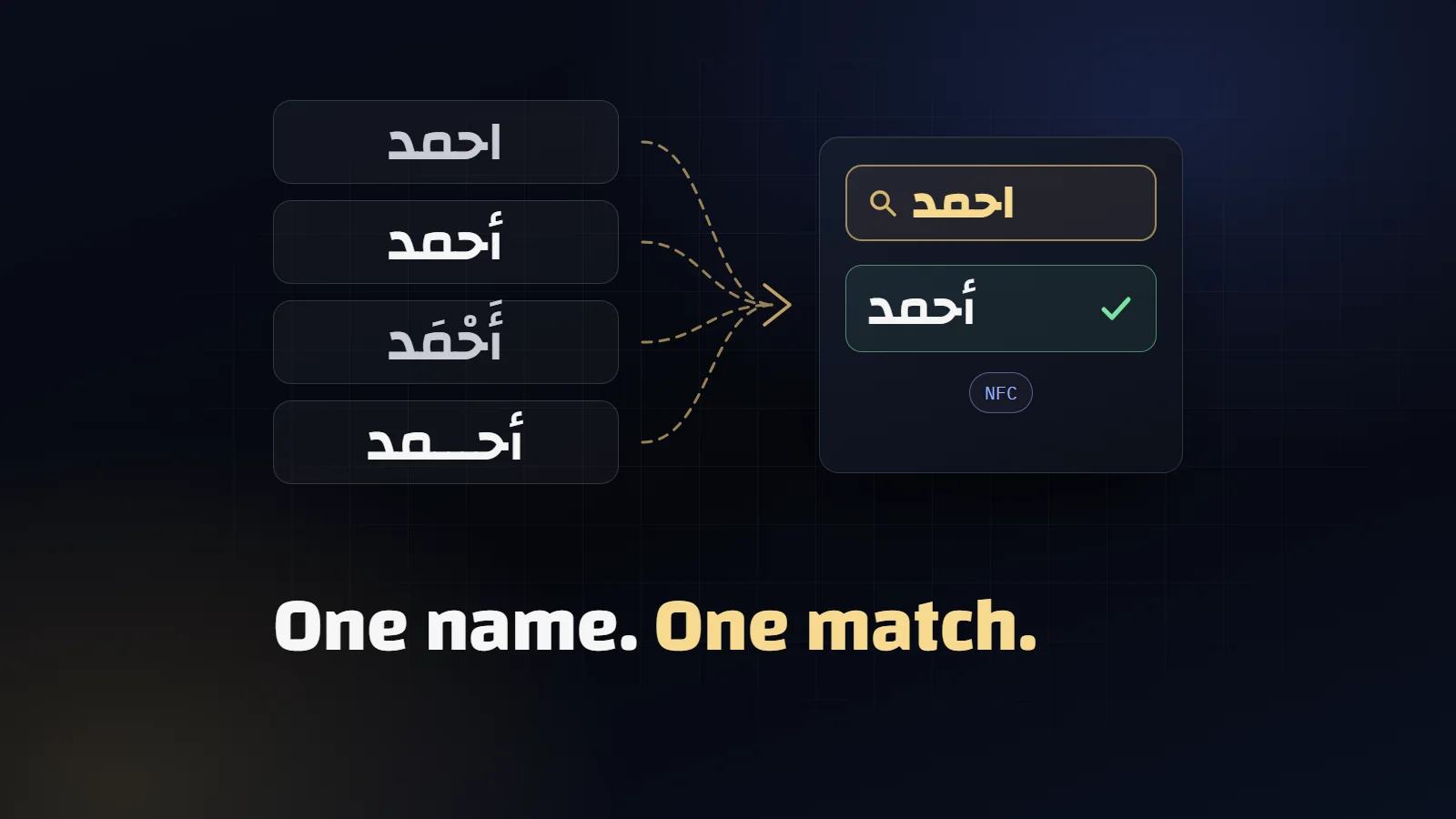
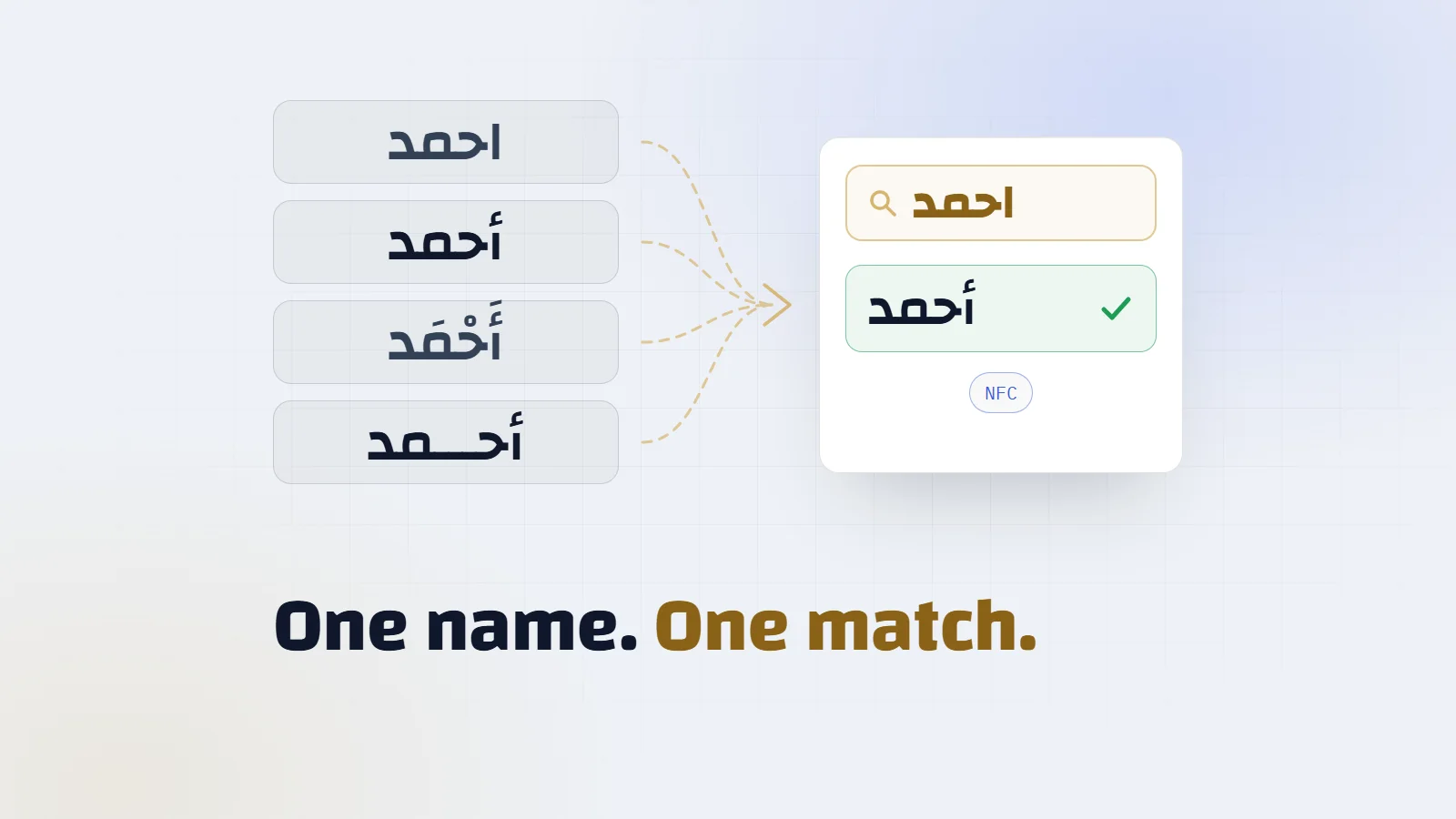
A receptionist types احمد into the search box. The customer saved last month as أحمد does not come up. To her it is the same name. To the database it is a different string.
The two words share three of their four characters. The first one is not the same: U+0627, a bare alef, against U+0623, an alef with a hamza on top. Most people type the bare one, because it is quicker and because nobody reads a name for its hamza.
Diacritics make it worse. مُحَمَّد, fully voweled, is eight code points. محمد is four. A search box that compares strings will never match them.
This article is the fix, as I build it. By the end you will know which normalisation rules are almost always safe, which ones quietly merge different words, why the index and the query must go through the same function, and where to keep the normalised copy: a column, a collation or memory. The examples come from the Arabic text normaliser on this site and from a digital library reader I built, which searches a 24-volume reference work offline.
In short
- Normalise the stored text and the query with the same function. Never normalise the text people read.
- Every rule merges something. Diacritics, tatweel and alef forms are safe nearly everywhere. Taa marbuta and alef maqsura depend on your text.
- Keep the normalised copy in its own column, index that column, and rebuild it whenever a rule changes.
1
code point between احمد and أحمد
8
code points in مُحَمَّد, against 4 in محمد
7
rules in the site's normaliser, 5 on by default
Two spellings of one name are two different strings
A computer compares text code point by code point. Unicode gives Arabic separate code points for every letter form a writer may choose, and for every mark they may add:
const hex = (s) => [...s].map((c) => c.codePointAt(0).toString(16).toUpperCase().padStart(4, '0'))

hex('احمد') // ['0627', '062D', '0645', '062F']
hex('أحمد') // ['0623', '062D', '0645', '062F']
'احمد' === 'أحمد' // false
The same text also arrives in different shapes for reasons the writer never sees. A hamza can be stored as one composed character, أ, or as a bare alef followed by a combining hamza, U+0627 U+0654. Both look identical on screen. Text copied from a web page can carry invisible direction marks. A title typed for a poster can carry tatweel, the stretching stroke in ظـــلام.
Exact comparison, LIKE, and every ordinary index treat all of these as different. Users do not. Normalisation closes that gap: before you compare, you fold the text into one spelling, so the variants a reader considers the same become the same string.
The trick is choosing what counts as "the same".
Every rule merges something
Each rule removes a distinction. Usually that distinction is noise. Sometimes it is the only thing that separates two words. Here is each rule with what it buys and what it costs, and what my two implementations chose:
| Rule | It lets this find that | It also merges | Site tool | Library reader |
|---|---|---|---|---|
| Remove diacritics | محمد finds مُحَمَّد | عِلْم (knowledge) and عَلَم (flag) | on | on |
| Remove tatweel | ظلام finds ظـــلام | nothing | on | on |
| Unify alef: أ إ آ ٱ to ا | احمد finds أحمد | أمن (security) and آمن (safe) | on | on |
| Alef maqsura to yaa: ى to ي | مستشفي finds مستشفى | على (on) and علي (Ali) | on | off |
| Taa marbuta to haa: ة to ه | مدرسه finds مدرسة | كرة (ball) and كره (hatred) | off | off |
| Hamza seats: ؤ to و, ئ to ي | سيئة typed as سييه | سُئل (was asked) and سيل (flood) | off | off |
| Arabic-Indic digits to 0 to 9 | 4527 finds ٤٥٢٧ | nothing | on | off |
The first three rules are safe in almost any product. Nobody types diacritics into a search box, tatweel is decoration, and hamza on alef is the most common thing people skip. The words they merge are rarely both in play, and when they are, the reader tells them apart in the results.
The middle rows are where the text decides.
The site's tool defaults to merging ى and ي, because it is built for names, products and places. Many people end a word with a dotless yaa, and on some keyboards that is the habit, so a search for مستشفى must find مستشفي and the other way round.
The library reader keeps them apart, on purpose. Its text is classical Arabic, where على is among the most frequent words in the language. Fold it into علي and every search for the name Ali drowns in prepositions. The project's requirements put the rule plainly: do not unify ة with ه or ى with ي unless a test proves it improves results without false matches. Both of its normalisers, one in Python and one in Dart, carry a test that asserts those words stay different.
Taa marbuta is off in both. Typing ه for ة is a real habit, but it merges real word pairs, and a missing result is easier for a user to fix than a page of wrong ones. Hamza seats are off too: they help with one class of misspelling and still leave مسؤول and مسئول apart, because the two spellings use different seats.
Tip
Decide the middle rows with your own data in front of you. Take the twenty most common words in your text, apply the rule, and look at what collides. It takes ten minutes and settles an argument that otherwise goes on for months.
Write the rules once, with escapes
This is what the site's tool prints with its defaults. It runs in the browser, and you can paste it straight into a codebase:
const normalizeArabic = (text) =>
  text
    .replace(/(?=\p{scx=Arab})\p{Mn}/gu, '')
    .replace(/ـ/g, '')
    .replace(/[أإآٱ]/g, 'ا')
    .replace(/ى/g, 'ي')
    .replace(/[ \t]+/g, ' ').replace(/ *\n */g, '\n').trim()
    .replace(/[٠-٩]/g, (d) => d.charCodeAt(0) - 1632).replace(/[۰-۹]/g, (d) => d.charCodeAt(0) - 1776)
Three details in it are easy to get wrong.
The diacritics are not "Arabic script". The harakat, shadda, sukun and tanween have the Unicode script value Inherited, because they are shared marks. \p{Script=Arabic} does not match them. Their script extensions do include Arabic, so the tool matches any non-spacing mark (\p{Mn}) whose extensions include Arabic (\p{scx=Arab}). That also catches the combining hamza, so a decomposed أ loses its mark and becomes ا like the composed one.
Tatweel is a letter, as far as Unicode is concerned. U+0640 is a modifier letter, not a mark, so the diacritics rule leaves it alone. It needs its own line. The same goes for alef wasla, ٱ: it has no decomposition into alef plus a mark, so only an explicit mapping folds it.
There are two sets of Eastern digits. Arabic-Indic digits start at U+0660. The Persian forms, typed on some phones and keyboards, start at U+06F0. They look alike in most fonts and they are different characters, so the tool converts both.
When you write ranges of Arabic code points by hand, write them as \u escapes. Literal Arabic in a regular expression is drawn by the editor's bidirectional layout, so the order you see is not always the order in the file. A range you read as U+064B to U+065F can be stored as U+064B to U+0670, and that range also contains the ten Arabic-Indic digits. Every number in your text silently disappears from the index.
The index and the query must agree
Normalisation only works when both sides of the comparison went through the same rules. If the index folds ى and the query does not, half the searches fail in a way nobody can reproduce from the outside.
The library reader makes that harder than usual, because its two sides are written in two languages. A Python pipeline turns the source documents into a SQLite database and writes the search text at build time:
ALEF = str.maketrans({'أ': 'ا', 'إ': 'ا', 'آ': 'ا', 'ٱ': 'ا'})

def normalize_arabic(text: str) -> str:
    # No NFKC: some passages use presentation-form code points as font-specific glyph IDs.
    text = unicodedata.normalize('NFC', text).translate(ALEF)
    text = ''.join(c for c in text if c != 'ـ' and not (
        unicodedata.category(c) in ('Mn', 'Me') and
        (0x0610 <= ord(c) <= 0x061A or 0x064B <= ord(c) <= 0x065F or
         ord(c) == 0x0670 or 0x06D6 <= ord(c) <= 0x06ED)))
    return re.sub(r'\s+', ' ', text).strip().lower()
The Flutter app normalises what the reader types, on the phone, offline:
static final _marks = RegExp(
  r'[ؐ-ًؚ-ٰٟۖ-ۜ۟-۪ۤۧۨ-ۭـ]',
);

static String normalize(String text) => unicode
    .nfc(text)
    .replaceAll(_marks, '')
    .replaceAll(RegExp('[أإآٱ]'), 'ا')
    .replaceAll(RegExp(r'\s+'), ' ')
    .trim()
    .toLowerCase();
The Dart character class looks different from the Python ranges, and it is the same set. Python keeps only the marks inside U+06D6 to U+06ED, and Dart lists exactly those code points, skipping the symbols and small letters in between.
Both start with NFC, the Unicode composed form, and that line matters. Without it, a waw followed by a combining hamza would lose its mark and fold to و, while the composed ؤ, typed on a normal keyboard, would stay ؤ. One word, two spellings in the index. With NFC first, both become ؤ before any rule runs. The Dart tests check it directly: an alef followed by a combining hamza above, one with a hamza below and one with a madda all normalise to a bare alef, exactly like the composed letters.
And both stop at NFC on purpose. NFKC, the compatibility form, would also unpack ligatures and presentation forms into ordinary letters, which sounds helpful. In this library some passages are set in a special font where presentation-form code points stand for specific glyphs. NFKC would rewrite them into other text.
- Build time, in Pythonthe original text is kept, a normalised copy is written beside it
- The indexfull-text search over the normalised copy only
- Search time, on the phonethe query goes through the same rules in Dart
- The resultmatched in the copy, shown and highlighted in the original
Each built volume also records normalization_version: 1. When a rule changes, the version says which volumes were indexed under the old one and need a rebuild.
Keep the original, search the copy
Never normalise the text people read. A normalised word is a search key, not a spelling. The library's database keeps both, side by side:
plain_text TEXT NOT NULL, normalized_text TEXT NOT NULL, rich_content TEXT NOT NULL,
-- …
CREATE VIRTUAL TABLE content_fts USING fts5(normalized_text, content=content_blocks, content_rowid=rowid, tokenize='unicode61 remove_diacritics 0');
The full-text index covers only normalized_text. Its tokenizer's own diacritic folding is switched off, so the only folding is the one the project chose and tested.
The hard part comes after the match. The hit is in the normalised copy, and the reader must see it highlighted in the original, marks and all. Positions do not line up, because normalisation deletes characters. So the app walks the original one character at a time and records, for every character of the normalised text, where it came from:
final clean = text.substring(index, index + width)
    .replaceAll(_marks, '')
    .replaceAll(RegExp('[أإآٱ]'), 'ا')
    .toLowerCase();
for (var j = 0; j < clean.length; j++) {
  buffer.write(clean[j]);
  starts.add(index);
  ends.add(index + width);
}
// A mark that normalised to nothing joins the letter before it.
if (clean.isEmpty && ends.isNotEmpty) ends[ends.length - 1] = index + width;
A match found at position found in the normalised text then maps back to the original range from starts[found] to the end of its last character. Because the marks join the letter before them, a search for العلم highlights the whole of العِلْمُ, final damma included. The tests pin the cases that break naive code: an emoji before the word, which takes two UTF-16 units, and a decomposed hamza, where the highlight must still cover the entire word. The excerpt shown under each result is cut from the original text too, so the marks a scholar typed stay on the page.
Where the copy lives: a column, a collation or memory
A stored column. This is the library's choice, and the one I reach for first. The copy is visible, you can SELECT it, test it and index it any way you like. In PostgreSQL the same idea is a generated column. I ran this on PostgreSQL 18.6:
-- Diacritics and tatweel out, alef forms and alef maqsura unified: the tool's defaults.
CREATE FUNCTION normalize_ar(t text) RETURNS text
LANGUAGE sql IMMUTABLE PARALLEL SAFE
RETURN translate(
  regexp_replace(normalize(t, NFC), '[ً-ٰٟـ]', '', 'g'),
  'أإآٱى', 'ااااي');

ALTER TABLE customers
  ADD COLUMN name_search text GENERATED ALWAYS AS (normalize_ar(name)) STORED;
CREATE INDEX customers_name_search ON customers (name_search text_pattern_ops);

SELECT name FROM customers WHERE name_search LIKE normalize_ar('احمد') || '%';
The query returns أحمد, and also the أحمد I stored as an alef plus a combining hamza. EXPLAIN shows an index scan on customers_name_search: the planner computes normalize_ar('احمد') once and uses the index for the prefix.
Two things surprised me in that test. A generated column must be STORED here: PostgreSQL 18 refuses a virtual one that calls a user-defined function. And when I replaced the function with a new rule, the rows already stored kept their old values while new rows used the new rule. Nothing warns you. After any rule change, rewrite the column (UPDATE customers SET name = name did it) or the index and the query quietly disagree.
A collation. Databases can compare text loosely through a collation, the rules that decide when two strings are equal and how they sort. PostgreSQL can build one from ICU, the Unicode library, with deterministic = false and the loosest strength, ks-level1. It costs no extra column. But it is someone else's normalisation. I asked the same server what an Arabic collation at that level considers equal:
| Pair | Equal under ar-u-ks-level1 |
|---|---|
| أحمد and احمد | yes |
| مُحَمَّد and محمد | yes |
| ظـــلام and ظلام | yes |
| على and علي | yes |
| ٣ and 3 | yes |
| مدرسة and مدرسه | no |
| آمنة and امنة | no |
| ٱلله and الله | no |
So it folds alef maqsura, which the library refuses, and keeps آ and ٱ apart, which both of my normalisers fold. You cannot switch one rule off. The PostgreSQL documentation also warns of a performance penalty, and pattern matching is limited: LIKE works with these collations only from PostgreSQL 18, and regular expressions still refuse them. Mine failed with "nondeterministic collations are not supported for regular expressions".
Memory. When the whole set fits in the browser, skip the database. The help centre I wrote for FinyX-ERP's website normalises every article's title, summary and keywords once, then checks that each word of the query appears in that text. It also strips a leading «ال» from each query word, so الفاتورة finds a guide that says فاتورة. For a few dozen documents, that is all the search engine you need.
The characters nobody can see
Some of the text you index was never typed. It was pasted, and pasting brings invisible passengers:
- Direction controls. Interfaces that mix Arabic and Latin wrap Latin runs in isolates, U+2066 to U+2069, so they display in the right order. FinyX-ERP's web code has a function that adds them for display, and the
normalizeArabicin the same file removes them before comparing. A copied product code with an isolate around it is a different string from the one typed by hand. - Persian letter forms. Text from Persian or Urdu keyboards uses ک and ی for kaf and yaa. If your users or your imported data come from there, add
کtoكandیtoيto your rules. - Latin inside Arabic. Product names, codes and brands. Lowercase them, as the library does, or Excel and excel will not meet.
- Spaces. Runs of spaces, tabs and line breaks. Collapse them to one space, as both implementations do.
The checklist
- Normalise the stored text and the query with the same function, and test that both sides agree.
- Never normalise the text people read. Store a separate search copy.
- Run NFC first, so composed and decomposed spellings become one before any rule runs. Stop at NFC unless you know your text has no special glyph encodings.
- Remove diacritics with
\p{scx=Arab}and\p{Mn}, not\p{Script=Arabic}. Remove tatweel separately. - Fold أ إ آ ٱ to ا. Decide ى, ة and hamza seats with your own text and a test for the words they would merge.
- Convert both Arabic-Indic and Persian digits.
- Write Arabic code point ranges as
\uescapes, never as literal letters. - Strip invisible direction controls and collapse spaces.
- Highlight results in the original text by mapping positions back.
- Version your rules, and rebuild the index or the generated column when they change.
Search is the moment your software meets the way people really type, and they type احمد.
Paste your own text into the Arabic text normaliser, turn each rule on and off, and copy the code it prints.
Share