Tech, explainedNo. 13
How online card payments work: what happens after you press Pay
One card payment in plain words: the gateway, the card network, your bank's code, the shop's own check, why "pending" happens and why a double charge is rare.


In this article
You are ordering dinner from a restaurant's website. You type your card number into a box, press Pay, and your phone buzzes with a text from your bank: a six-digit code. You type it in. A moment later the page says your order has been placed.
Between your first tap and that last screen, your payment left the restaurant's page, crossed a card network, reached your bank, waited for you, and came back. The restaurant was told only at the very end, and it never saw your card number.
I build these flows. FinyX-ERP, my accounting and point-of-sale product, includes a restaurant ordering platform whose web store takes mada, Visa, Mastercard and Apple Pay through Moyasar, a Saudi payment gateway. An AI marketing platform I built bills its subscriptions through Moyasar too.
By the end you will know who takes part in a card payment, why the shop never holds your card number, what the code from your bank is for, why a payment sometimes sits on "pending", and why being charged twice for one order is rare.
In short
- Your card details go to the payment gateway, not to the shop. The shop receives a payment number and a status.
- The code from your bank is 3-D Secure: your bank asking you, and only you, to approve this amount at this shop.
- A careful shop believes no message about a payment until it has asked the gateway itself, and one payment can only ever pay for one order.
0
card numbers that reach the restaurant's servers
1
order per payment, enforced by the database
30 min
that a checkout stays open in the FinyX store
~2 h
to cancel a payment before it settles
Five parties take part in one tap
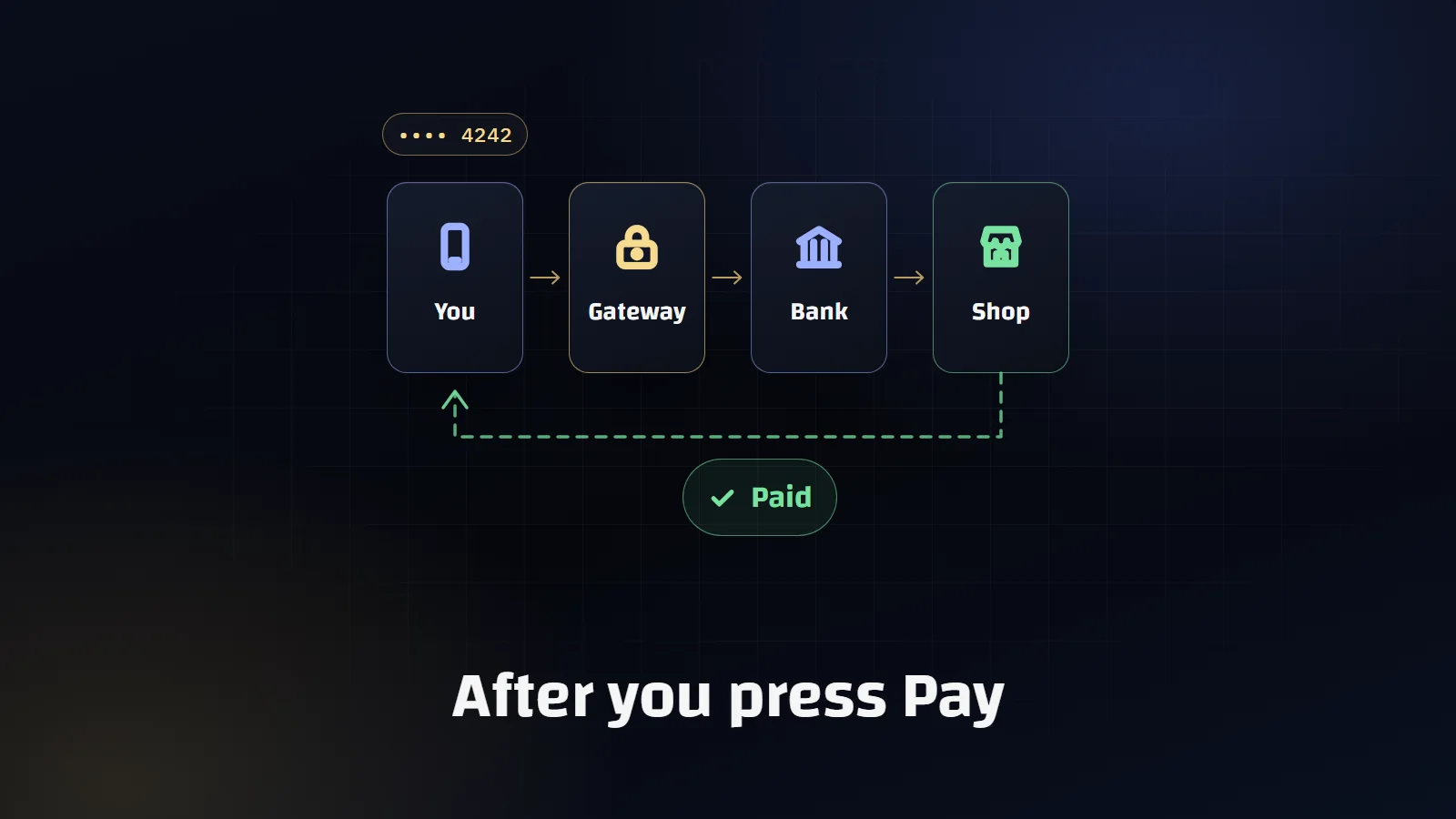
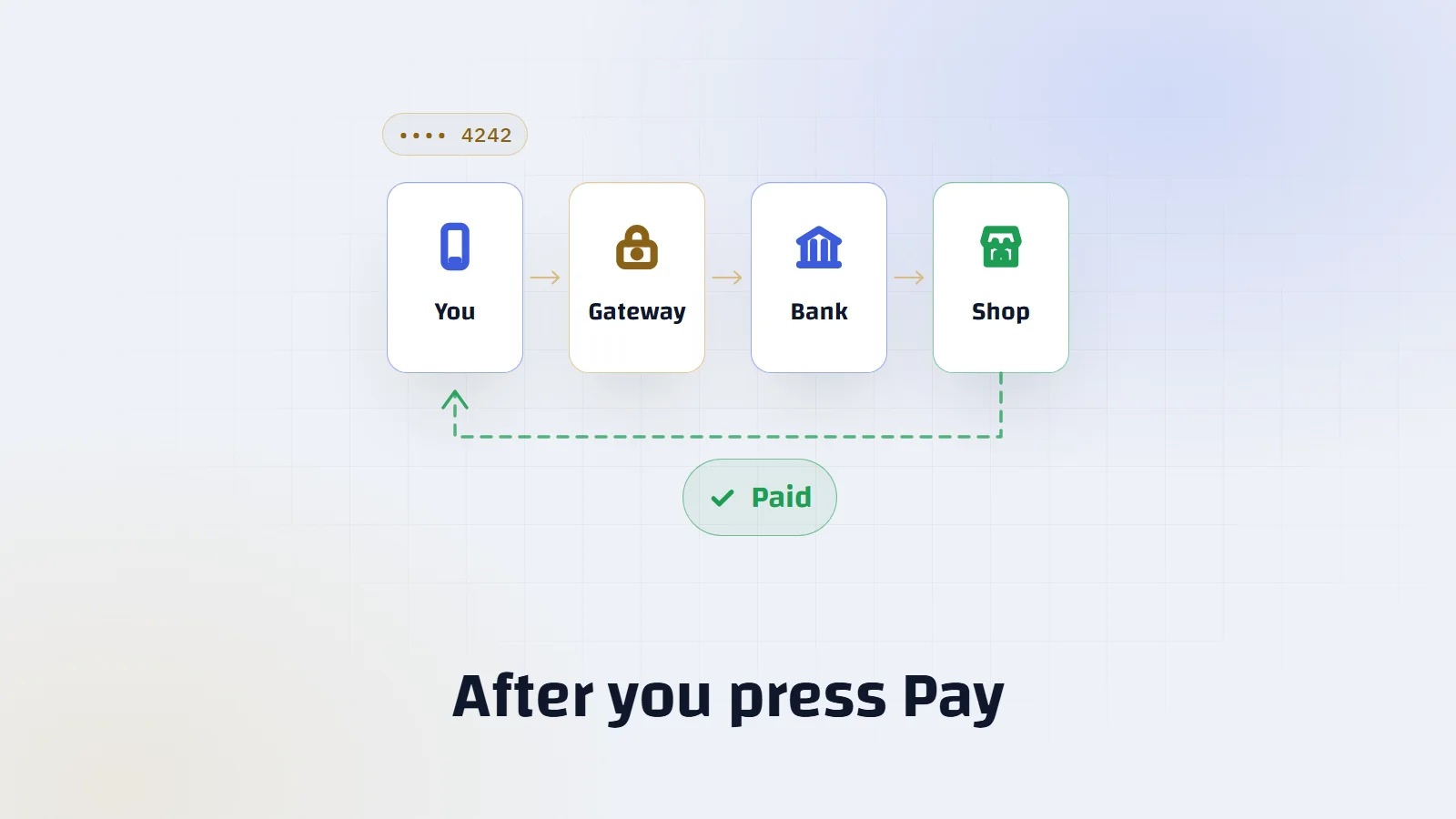
A card payment looks like a conversation between you and a shop. It involves five parties:
| Who | What they do |
|---|---|
| The shop | Sets the price and waits for a yes or a no |
| The payment gateway | Takes your card details and talks to the banks on the shop's behalf (Moyasar, in my systems) |
| The card network | Carries the request to the bank that issued your card: mada inside Saudi Arabia, or Visa and Mastercard |
| Your bank | Checks the card, the balance and the risk, and may ask you to confirm |
| The shop's bank | Receives the money for the shop later, when the payments are settled |
The question that travels through all of them is short: may this card pay this amount to this shop? Your bank answers it. Everyone else carries the question and the answer.
- You press Payyour card details go into the gateway's form
- The gatewaysends the request into the card network
- Your bankchecks the card, then asks you for a code
- The answertravels back to the gateway
- The shopasks the gateway, then places the order
The shop never sees your card number
When you type your card number on a well-built store, you are typing it into the gateway's form, not the shop's.
In the FinyX restaurant store, the payment window is drawn by Moyasar's own script inside the page. The comment at the top of that component in my code says it plainly: the card details are written into the gateway's form and go to it directly, so they pass through neither the store nor the restaurant's server. The window tells the customer the same thing in Arabic, under a small lock.
The marketing platform sends the customer to a payment page hosted by Moyasar, then brings them back. The note in its code gives the reason: no card data touches our servers, and we carry none of the PCI obligations. PCI DSS is the security standard for every business that handles card numbers, and the simplest way to meet most of it is never to handle one.
Apple Pay goes further. According to Apple, neither Apple nor your phone sends your actual card number. The shop receives a number made for your device and a security code made for that one payment.
What the shop gets back is a payment number and a status. That is why a leaked shop database should never contain your card.
The code from your bank is 3-D Secure
The text with a six-digit code, or the approval request in your bank's app, is called 3-D Secure. It is your bank asking you directly: did you start this payment, for this amount, at this shop?
While your bank waits for that answer, the gateway marks the payment as initiated. Moyasar's documentation describes that status as a payment that needs an action, such as a 3-D Secure challenge, before it can complete. Once you answer, it becomes paid or failed.
Two things make this code worth respecting. It is tied to one amount at one shop, which is why the bank's message names both: read them before you type the code. And it is meant for you alone. Nobody at the shop, the gateway or your bank needs to hear it from you. Someone who asks for it is trying to approve a payment you did not start.
The shop checks with the gateway before it believes anything
After your bank approves, the gateway sends you back to the shop's page with a payment number in the address. A careless shop would see that number and mark the order paid. Anyone can edit an address, though.
So the FinyX server does not trust the browser. It takes the payment number and asks Moyasar about it with its secret key, a password only the server holds. Then it checks four things before an order reaches the kitchen:
- the status is
paid, - the currency is the same,
- the amount is exactly the amount the server priced,
- the payment names the same checkout, the session the server opened when you pressed Pay.
The price itself comes from the shop's own records, never from your browser. The marketing platform's checkout reads the plan's price from its database, and the comment above it says why: otherwise a customer could send a price of one riyal for the business plan.
Amounts travel in the smallest unit of the currency. For the riyal that is the halala, so 46.00 riyals is sent as 4600. The marketing platform's code warns about the obvious mistake: send riyals where halalas are expected and you charge one percent of the right amount, silently.
{ "id": "…", "status": "paid", "amount": 4600, "currency": "SAR",
  "metadata": { "checkout_id": "…" } }
That is the part of the gateway's answer the FinyX server reads: the payment's number, its status, the amount in halalas, the currency, and the checkout it belongs to. There is no card number in it.
Two roads lead to "paid"
Phones lose signal. Batteries die. A customer can pay and never come back to the shop's page. So news of a payment reaches the shop by two roads.
The first is you, coming back from the gateway. The second is a webhook: a short message the gateway sends to the shop's server on its own, the moment a payment is paid. The comment above that endpoint in FinyX gives its purpose: it places the order even if the customer's connection dropped before they came back.
A webhook is a message from the outside world, and the FinyX server treats it that way. It must carry a secret that only Moyasar and the server know, and even then the server does not believe what the message says. It fetches the payment from Moyasar and runs the same four checks.
Both roads can arrive at the same moment. The FinyX database stores each payment's number on the order it paid for, and it refuses a second order with the same number. One road places the order, and the other reads what was placed.
Why a payment sits on "pending"
"Pending" means the shop has not yet received a final answer. It is almost always one of three things:
| What you see | What usually happened |
|---|---|
| Pending, and you never typed a code | The bank's step is still open, so the payment is still initiated |
| Pending after you approved | You left before the gateway sent you back, and the webhook has not arrived yet |
| An amount held by your bank, and no order | Your bank reserved the money, but the payment never completed |
In the FinyX store, a checkout you start stays open for 30 minutes. Not every shop takes cards online, either. The store I built for Bin Masoud takes cash on delivery or a bank transfer, and a photo of the transfer receipt is recorded as a pending payment that staff verify from the order page. Pending there is a person checking, not a network.
Tip
When a payment shows as pending, do not pay again straight away. Check the order page and your bank's messages first. A second payment is the one thing that can turn a slow payment into a double one.
Why you are rarely charged twice
The shop's real fear is the same as yours: one order, paid twice. You press Pay twice, or the page reloads, or both roads arrive together. The idea that protects against this has a long name, idempotency, and a short meaning: doing the same thing twice has the same effect as doing it once. I wrote about it at length in an article about offline billing.
In the FinyX store, that rule takes three forms:
- One payment places one order. The payment's number is unique among orders.
- A second payment for an order that is already paid, the two-taps case, goes back to the card in full, and the customer is told so.
- A payment that could not become an order, because a price changed or the restaurant closed while you were paying, goes back as well. No money stays with the restaurant without an order.
Money goes back in one of two ways. For roughly two hours a payment can be voided, cancelled before it settles and without processing fees, according to Moyasar's guide. After that it is refunded. FinyX tries the void first, then the refund.
The staff screen closes the loop. An order paid online is labelled as paid, with a note that nothing is to be collected, so nobody at the door asks you for money you already paid.
Before and after you press Pay
- Check the address bar: you should be on the shop's real site, or on the gateway's page it sent you to.
- Read the amount and the shop's name in your bank's message before you type the code.
- Never tell anyone that code, by phone or by chat. No shop, gateway or bank needs it from you.
- If a payment shows as pending, check the order page and your bank before you pay again.
- If you were charged and got no order, keep the bank's message and the time, and contact the shop.
- Use Apple Pay where it is offered: the shop then never receives your card number.
- If you run a shop: price on the server, confirm every payment with the gateway, and let one payment place one order.
A good payment flow rests on one habit: nobody believes a message about money until they have checked it at the source. Your bank checks with you, and the shop checks with the gateway.
This is how I build online stores and ordering platforms.
Share