For business ownersNo. 16
Who can delete an invoice? Permissions and audit trails for owners
The losses that start inside a business, a who-may-do-what table you can copy, money that is reversed and never edited, and what to ask a vendor to show you before you buy.


In this article
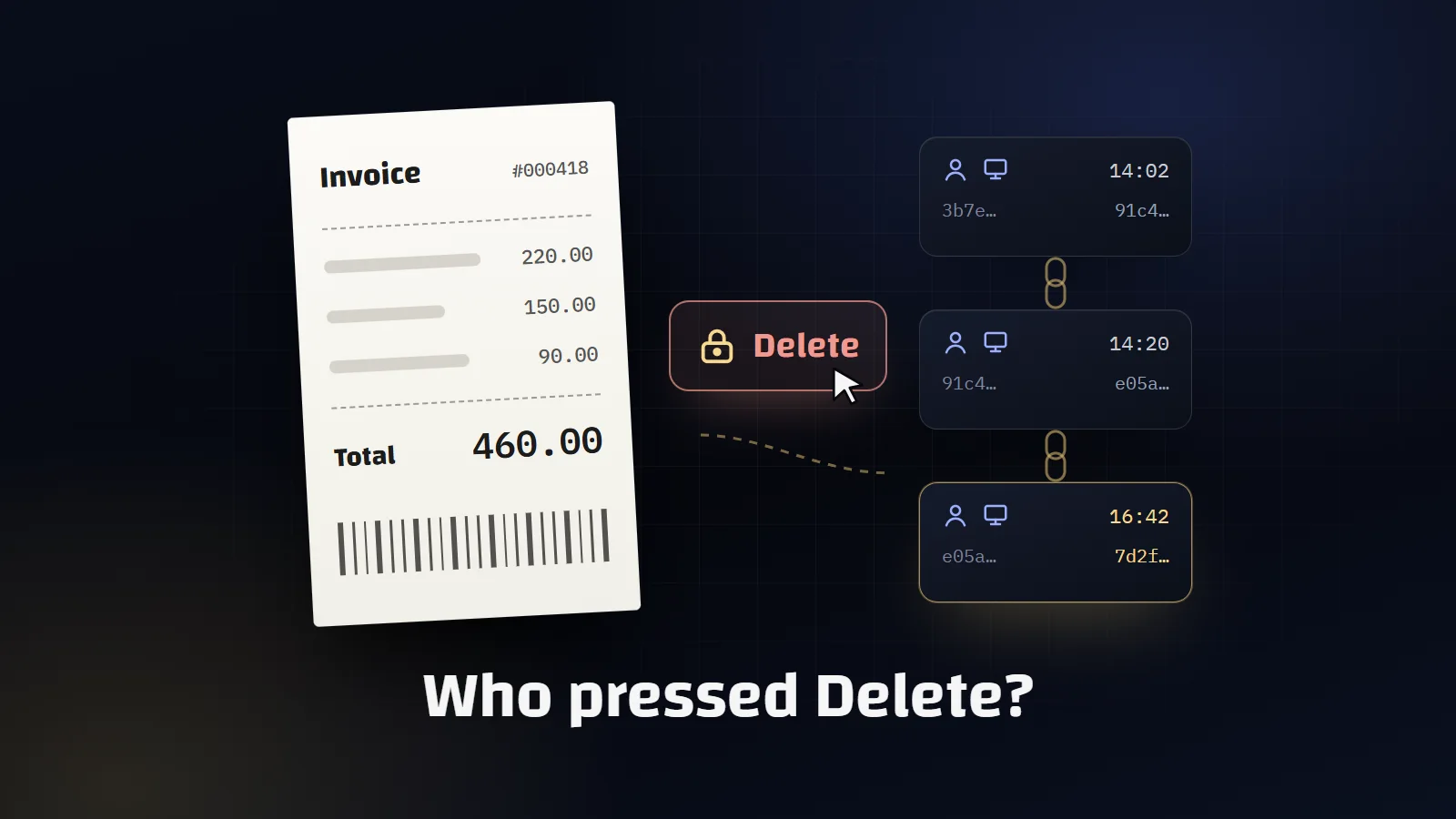
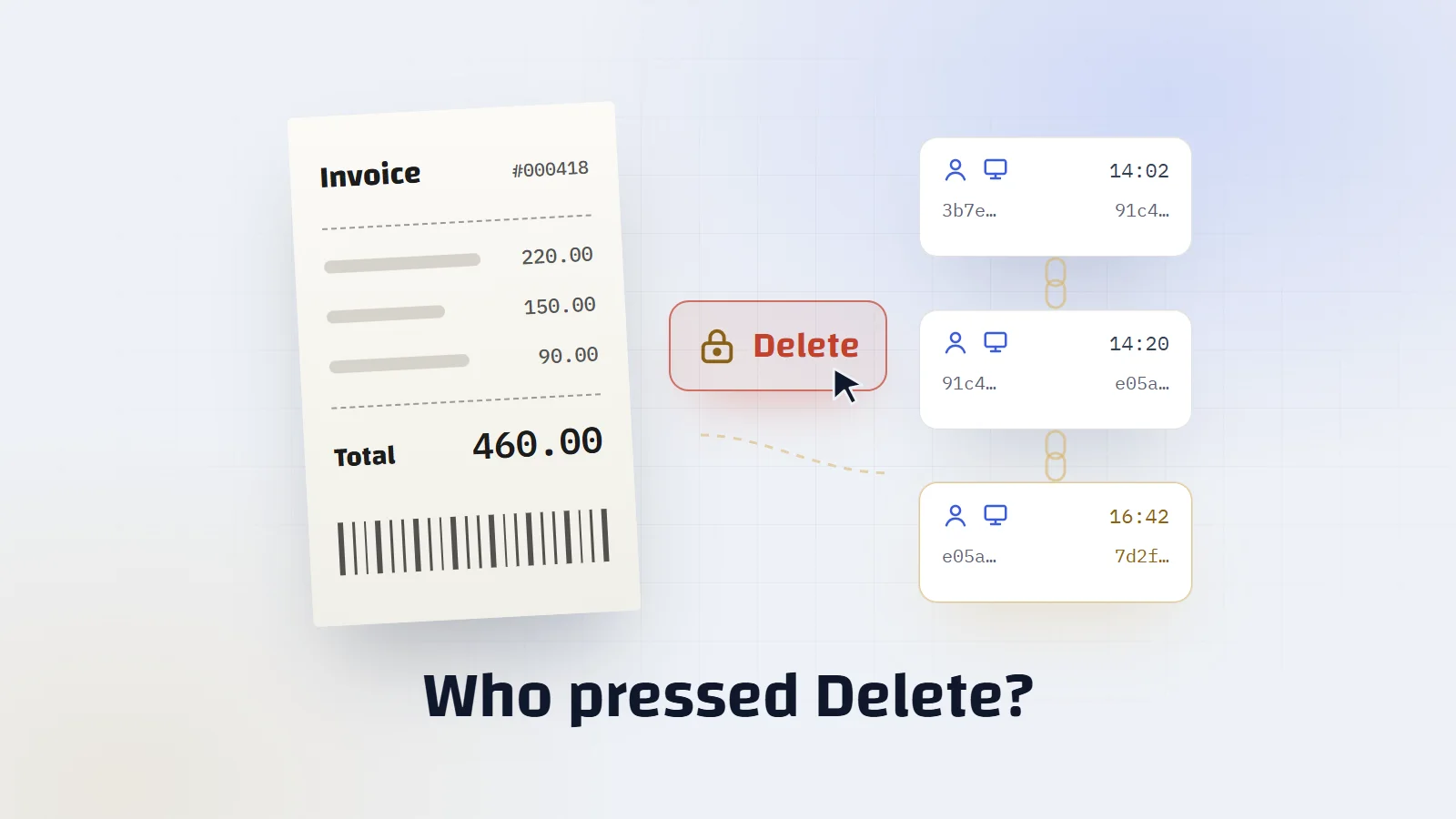
Imagine an ordinary afternoon at a shop. A customer pays 460 riyals in cash, takes the receipt and leaves. Twenty minutes later the invoice is deleted.
The drawer now expects 460 riyals less, so the cash count at closing is exact. The item goes back into stock on the screen, though it is no longer on the shelf, and nobody will notice until the next stocktake. No total is wrong. Every report balances.
One question is left: who pressed Delete? Whether your system can answer it was decided on the day you chose it.
Most money a business loses from the inside leaves through an ordinary button that someone was allowed to press. I build accounting and point-of-sale systems, and the first thing I ask any owner is who may do what. By the end of this article you will have a who-may-do-what table for your own business, the one rule about money that protects you most, a plain picture of an audit trail that notices tampering, and a list of things to make a vendor show you before you buy.
In short
- Give each job only the actions it needs. Deleting, changing prices, selling below the minimum price and seeing cost are separate permissions, and a cashier needs none of them.
- Money that has been recorded is never edited. A mistake is corrected by a second document that reverses the first, and both stay in the history.
- An audit trail records who did what, when and on which device. A good one also notices when someone edits it behind the system's back.
16
ready-made roles in FinyX-ERP, from owner to auditor
0
delete permissions in its cashier role
49 → 59
permissions on one platform's list, in seven weeks
The risks that start inside the business
Losses from the inside come in three shapes, and none of them breaks a total.
- A paid sale that disappears. The invoice is cancelled or deleted after the customer has left, and the cash goes with it.
- A price that bends. An item is sold below its price, or a discount is given to a friend, and the invoice looks normal.
- A sale that never existed. The goods leave and nothing is rung up at all.
The first two happen inside the system, so the system can prevent or record them. The third happens outside it, so the system can only make it visible later, through stock counts and cash shifts handled by different people. Permissions and audit trails exist for exactly this: make the risky actions impossible for most of your staff, and record the rest in a way nobody can quietly undo.
Give each job only the actions it needs
A permission is a yes or no the system checks before it lets someone do one thing: sell, delete an invoice, see a cost price. A role is a named bundle of permissions for one job, such as cashier or accountant.
FinyX-ERP, the accounting and point-of-sale system I build and sell, ships with 16 ready-made roles. This is how five of them start, before an owner changes anything:
| Action | Cashier | Branch manager | Accountant | Auditor | Owner |
|---|---|---|---|---|---|
| Sell and print the receipt | yes | yes | no | no | yes |
| Give a discount | yes | yes | no | no | yes |
| Record a return | yes | yes | yes | no | yes |
| Change an item's price | no | no | no | no | yes |
| Sell below the minimum price | no | no | no | no | yes |
| Edit or delete an invoice | no | no | no | no | yes |
| See cost prices | no | no | no | yes | yes |
| Approve a stock count | no | no | no | no | yes |
| Read the audit trail | no | no | no | yes | yes |
A few rows carry most of the protection.
Changing a price and selling below the minimum are two permissions on purpose. Changing a price is daily work for a salesperson. Going under the floor the owner set is a different decision, usually a sale at a loss. If one permission granted both, the floor would mean nothing. When an invoice does go below the minimum, FinyX writes on it the name of whoever approved it.
Counting stock and approving the count are separate. A warehouse keeper counts. Approving the differences, which changes the stock figures, belongs to a manager. The same split runs through the cash: sending cash from one drawer and receiving it at another are separate permissions, and so are recording a cheque and deciding its fate. When one person holds both halves, a document stops being evidence.
The auditor reads everything and changes nothing. The role is worth having even if the auditor is you, once a week.
Tip
Draw this table for your own business before you look at any software: one row per action that moves money or stock, one column per job. It becomes the brief for your vendor and, later, the first page you check when a number looks wrong.
A hidden button is not a permission
In September 2026 I found a leak in FinyX's inventory screen. The button that opens the stock value at cost was hidden from anyone without permission to see cost. A keyboard shortcut, Ctrl+I, opened the same table directly, and it asked nothing. A cashier who pressed it could read the stock value at cost, category by category, and with it the owner's margin.
Nothing miscalculated and no test failed. The fix moved the check into the one place both paths pass through, and a new test proves a cashier sees no cost column, totals or breakdown. The commit message puts it in one line: hiding a button is screen tidying; refusing the action is the permission.
For an owner, the lesson is one question for any vendor: where is the permission checked? The right answer is where the data is read or changed, so every screen, shortcut and app meets the same check.
Your table will change, and that is healthy
On a network operations platform I built, the permission list had 49 entries in four roles in early August 2026: system owner, network manager, employee and distributor. Seven weeks later it had 59. Almost every addition took one broad power and split it in two.
- Early August49 permissions in four roles
- 15 Augustfour account statements become separate grants
- 18 Augustwho may supply cards to distributors, and who to shops
- 10 Septemberwho sees recent operations on the dashboard
- 22 Septemberwho may publish the exchange rate: 59 permissions
Moving stock had been one permission. Now the owner decides, per account, whether someone may supply distributors, shops, or both. A distributor's statement can be shown to one person without opening every report to them.
Two rules in that platform are worth asking for by name. New permissions start switched off for managers: a power added to the system never reaches a manager just because it exists. And an account with history cannot be permanently deleted. If it recorded or decided anything, wrote a message or holds a balance, the system refuses and names the reason. The account is switched off instead, and its name stays on everything it did.
Money is never edited. It is reversed
An accountant with a paper ledger never rubs out a line. He writes a correcting line underneath, and both stay on the page. Good software keeps the same rule.
In FinyX, a posted invoice cannot be changed. A mistake is corrected with a new document, such as a return that reverses the sale, the stock and the accounting entry together. In FinyxWatt, my platform for electricity and water stations, the table of what each customer owes refuses edits and deletions even from the platform's own server, and a cancelled payment is a new entry that reverses it. The network operations platform corrects with reversing entries too, and its acceptance report checks that nothing was reversed twice.
Owners sometimes need to remove an invoice outright: a test entered on the live system, or a duplicate. FinyX has one door around the rule for that, built to be loud.
- Confirmthe warning names the invoice and says it cannot be undone
- Return the goodsthe quantities go back into stock
- Remove the entrythe invoice leaves the books
- Write the recordwho, which invoice, when and on which computer
- Guards back onthe database protections return, even if the delete fails halfway
By default the owner, administrator and manager roles hold that door, and no cashier, accountant or auditor does. Whoever uses it, the audit record stays after the invoice is gone.
An audit trail that notices when it is edited
In FinyX, every record that is created, changed or deleted writes an audit entry: the time, the user, the action, the record, the fields that changed, the values before and after, and the computer it happened on. The audit report shows those columns, and by default only the owner, administrator and auditor roles can open it.
An audit trail has one weak point: anyone who opens the database file with a database tool could delete a sale and its audit entry together. So each entry also carries a fingerprint, a short code computed from its content, together with the fingerprint of the entry before it. Change one character in an old entry and its fingerprint stops matching. Remove an entry and the next one points at a fingerprint that no longer exists. Think of a bound receipt book with numbered pages: tear one out and the gap shows.
The count of entries and the last fingerprint are also kept outside the database, so a log that got shorter shows up too. FinyX checks the whole chain every time it starts, and a broken chain does not stop the till, because whoever tampered with the log is rarely the person at the till in the morning. The technical detail is in how I keep FinyX correct on my own.
What to ask a vendor to show you
Not tell you. Show you, on a test copy, before you pay.
- Sign in as a cashier and try to delete a paid invoice. Then try the same from every route: the invoice list, the invoice screen, a keyboard shortcut, the phone app.
- Change the price on an invoice that has already been posted. The system should refuse and point you to a return or a correcting document.
- Open the audit trail for that invoice. Who created it, who touched it, and what did it say before?
- Edit the database directly on the test copy, and show me the system noticing.
- Give me the table of roles and permissions on paper.
- Can I create a role that reads everything and changes nothing?
- When an employee leaves, can I switch the account off and keep their name on everything they did?
- Who sees cost and profit, and can I hide them from one person without changing their whole role?
A vendor who can show all eight in twenty minutes has built for the risks in this article. One who needs a week to answer has not.
The checklist
- Write your who-may-do-what table before you look at software.
- Give cashiers no delete, no price change and no view of cost.
- Split the halves: who counts and who approves, who sends cash and who receives it, who records a cheque and who decides its fate.
- Keep selling below the minimum price, and every power that removes records, to yourself.
- Insist that money is reversed, never edited, and that every correction carries a name.
- Ask where permissions are checked, and test a shortcut, not only the button.
- Read the audit trail once a week, even for ten minutes.
- Switch accounts off the day someone leaves. Do not delete them.
Good permissions are not a statement about your staff. When a number looks wrong, the record shows exactly who did what, and no honest employee has to be suspected.
This is how I build the business systems I deliver to clients.
Share